# Gestion de spamming

La gestion des courriers indésirables (*spams*) est automatisée sur la **<sub>![logo_icon_zimbra.png](https://portail.ac-reunion.fr/ladoclela/uploads/images/gallery/2025-08/scaled-1680-/logo-icon-zimbra.png) </sub>**messagerie nationale Zimbra. Les spams sont automatiquement filtrés, et un rapport vous est envoyé chaque jour à **9h et 15h en hiver**, et à **10h et 16h en été** (*heure de La Réunion*). Ce rapport vous permet de consulter les messages bloqués et de les libérer si nécessaire.

<p class="callout info">Si aucune action n’est effectuée, les messages considérés comme spams seront **automatiquement supprimés au bout de 14 jours**.</p>


#### **⚠️Problème temporaire pièce jointe**

<details id="bkmrk-%E2%9A%A0%EF%B8%8Fprobl%C3%A8me-pi%C3%A8ce-joi"><summary>⚠️Problème temporaire pièce jointe</summary>

**La <sub>![logo_icon_zimbra.png](https://portail.ac-reunion.fr/ladoclela/uploads/images/gallery/2025-08/scaled-1680-/logo-icon-zimbra.png) </sub>messagerie nationale Zimbra rencontre actuellement des problèmes avec les pièces jointes envoyées ou reçues lorsqu’il s’agit de fichiers protégés par mot de passe** *(par exemple : fichiers .zip, .pdf chiffrés, ...)* **ou de fichiers PDF générés automatiquement** *(par exemple : avis\_Sirene.pdf)***.**

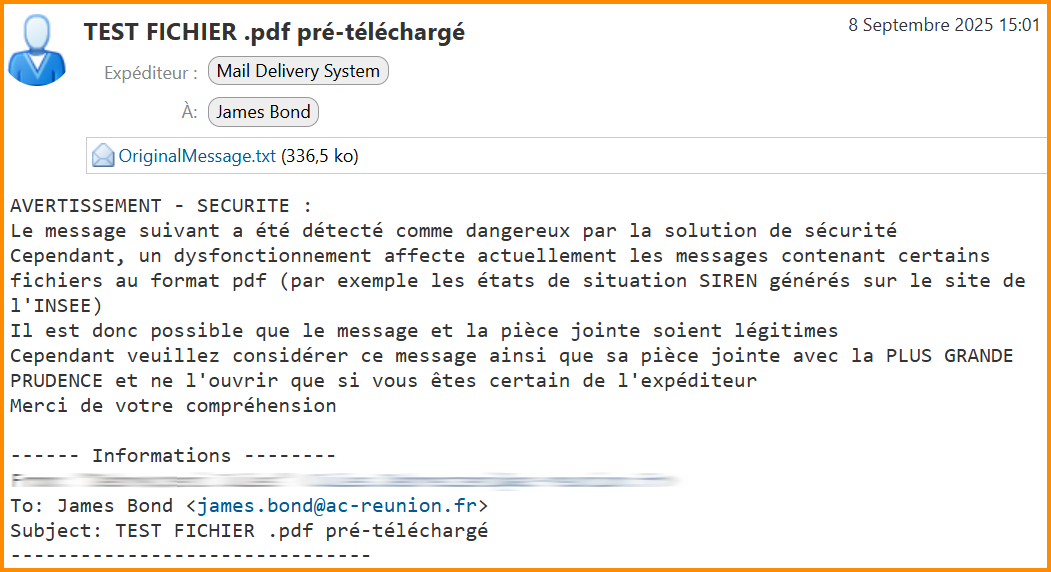
Voici le message que vous recevez lorsqu’une personne tente de vous transmettre une pièce jointe dans ces conditions :

[![spam1.png](https://portail.ac-reunion.fr/ladoclela/uploads/images/gallery/2025-09/scaled-1680-/spam1.png)](https://portail.ac-reunion.fr/ladoclela/uploads/images/gallery/2025-09/spam1.png)
<span style="text-decoration: underline;">**Solutions :**</span>

- Dans un premier temps, si vous recevez ce mail expédié par Mail Delivery System et que vous en connaissez la légitimité, cliquez sur la pièce jointe **« OriginalMessage.txt »**. Vous y retrouverez le message initial ainsi que sa pièce jointe.
- Pour vos prochains envois de pièces jointes, utilisez directement l’outil <sub>![logo_icon_filesender2.png](https://portail.ac-reunion.fr/ladoclela/uploads/images/gallery/2025-09/scaled-1680-/logo-icon-filesender2.png)</sub>[**FileSender**](https://filesender.renater.fr/) (accessible depuis votre profil ***<sub>**![logo icone metice.png](https://portail.ac-reunion.fr/ladoclela/uploads/images/gallery/2025-08/scaled-1680-/logo-icone-metice.png)**</sub>***[Métice](https://sso.ac-reunion.fr/login?service=https%3A%2F%2Fhubole.ac-reunion.fr%2Fedispatcher%2Fng%2Fhub)). Un tutoriel pour utiliser <sub>![logo_icon_filesender2.png](https://portail.ac-reunion.fr/ladoclela/uploads/images/gallery/2025-09/scaled-1680-/logo-icon-filesender2.png)</sub>FileSender est disponible sur [ce lien](https://portail.ac-reunion.fr/ladoclela/link/4252#bkmrk-envoyer-une-pi%C3%A8ce-jo-2).

</details>---

#### **Message de notification**

<details id="bkmrk-message-de-notificat-2"><summary>Message de notification</summary>

![spam2.png](https://portail.ac-reunion.fr/ladoclela/uploads/images/gallery/2025-08/scaled-1680-/heUspam2.png)

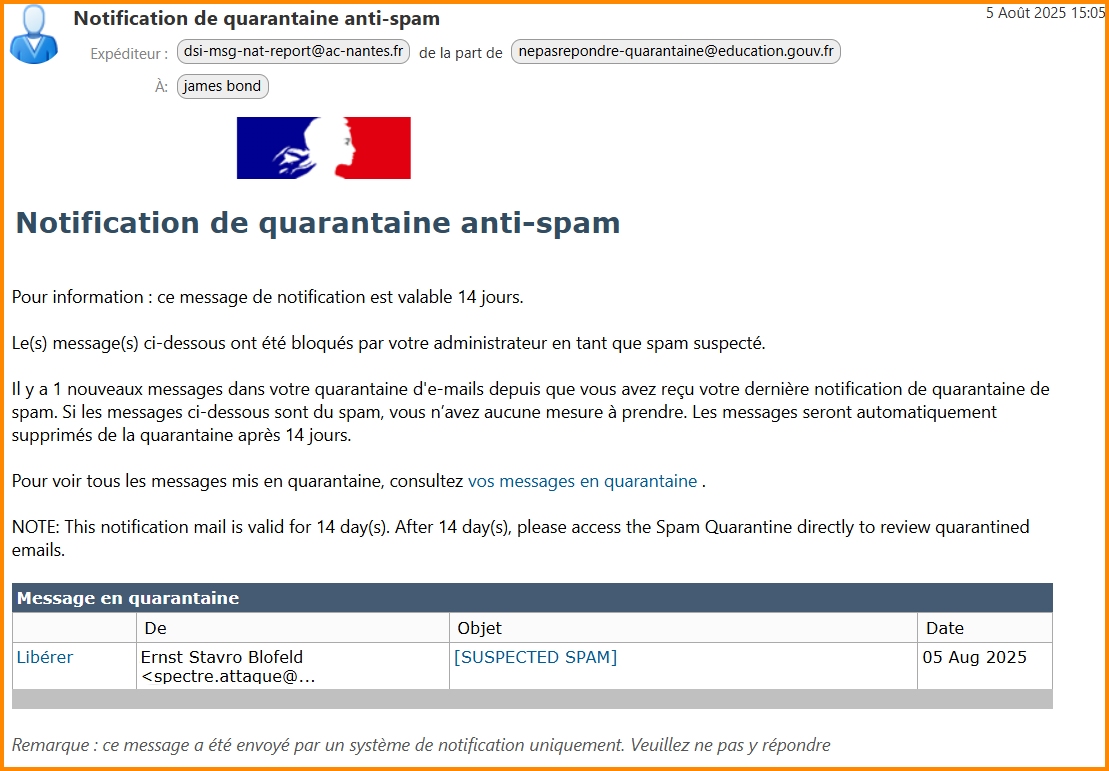
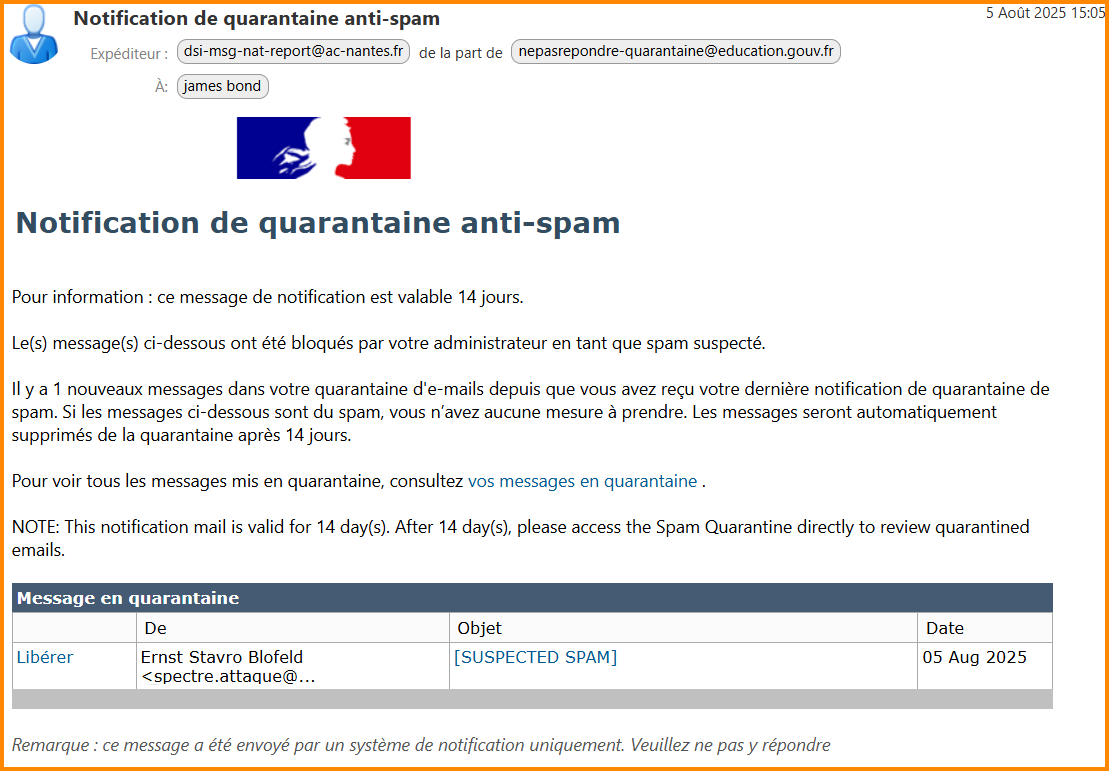
La notification de quarantaine anti-spam répertorie l’ensemble des courriels bloqués, identifiés comme indésirables, avec l’indication de l’expéditeur et de la date de réception. Ces informations vous permettent de suivre et d’affiner le filtrage de vos spams.

</details>---


#### **Gérer ses messages en "quarantaine"**

<details id="bkmrk-g%C3%A9rer-ses-messages-e-1"><summary>Gérer ses messages en "quarantaine"</summary>

- **Ouvrez le mail ayant pour objet "Notification de quarantaine anti-spam".**

[![spam2.png](https://portail.ac-reunion.fr/ladoclela/uploads/images/gallery/2025-08/scaled-1680-/PYnspam2.png)](https://portail.ac-reunion.fr/ladoclela/uploads/images/gallery/2025-08/PYnspam2.png)
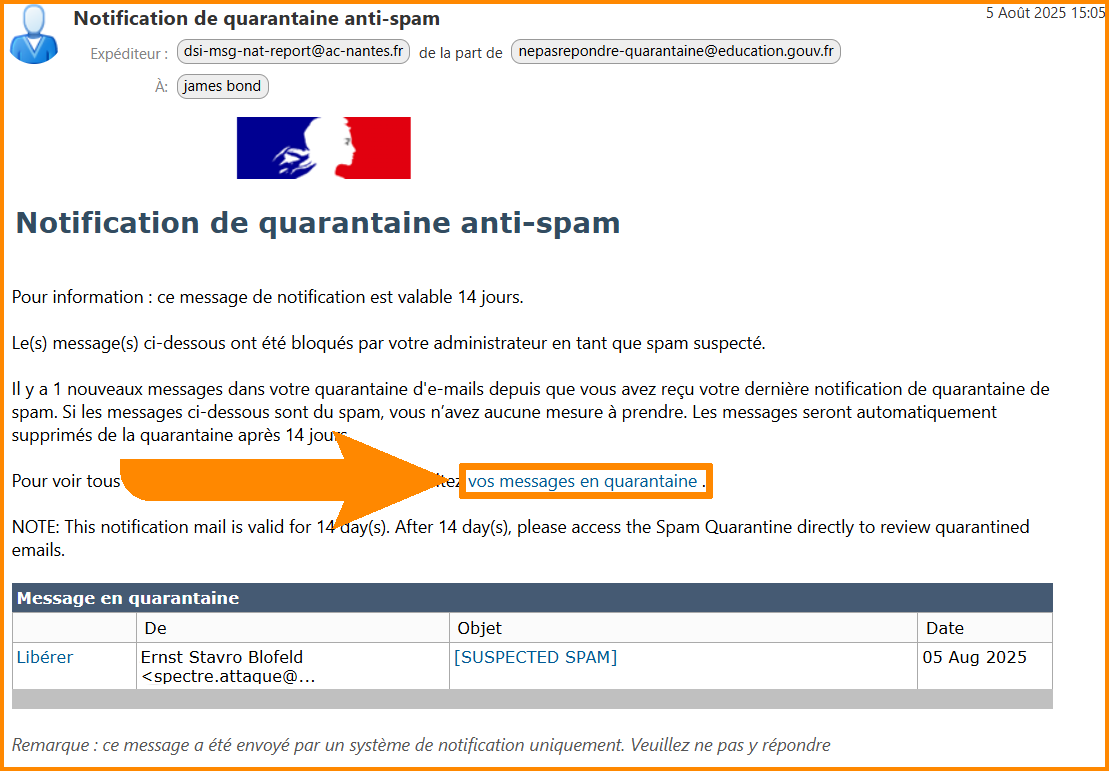
- **Cliquez sur "vos messages en quarantaine".**

[![spam3.png](https://portail.ac-reunion.fr/ladoclela/uploads/images/gallery/2025-08/scaled-1680-/taIspam3.png)](https://portail.ac-reunion.fr/ladoclela/uploads/images/gallery/2025-08/taIspam3.png)
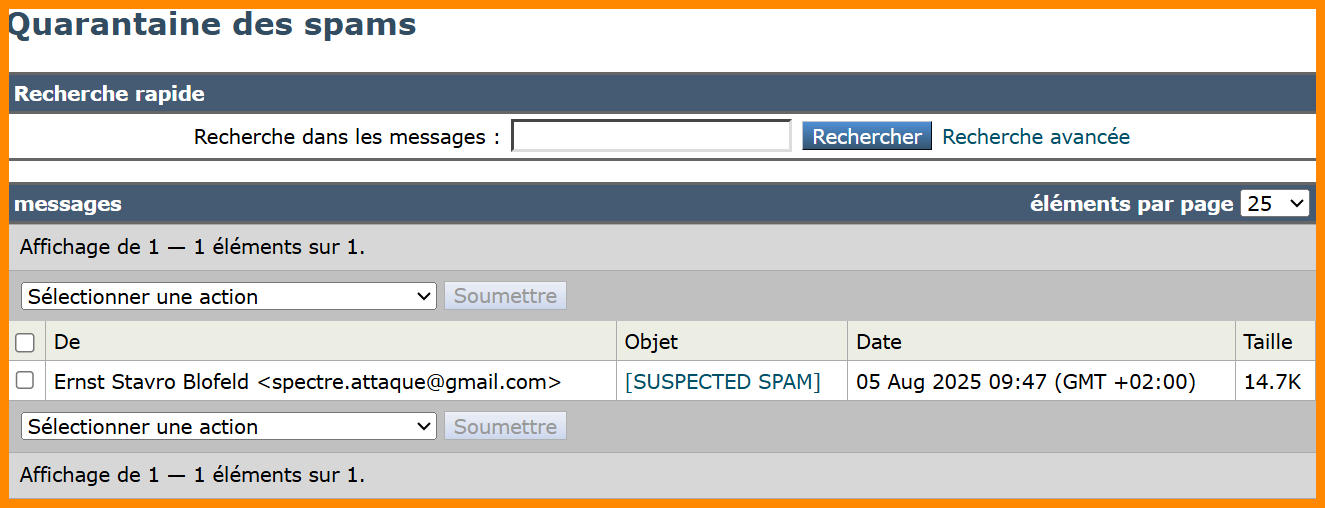
- **Une nouvelle page s'ouvre.**

[![spam4.png](https://portail.ac-reunion.fr/ladoclela/uploads/images/gallery/2025-08/scaled-1680-/D6dspam4.png)](https://portail.ac-reunion.fr/ladoclela/uploads/images/gallery/2025-08/D6dspam4.png)
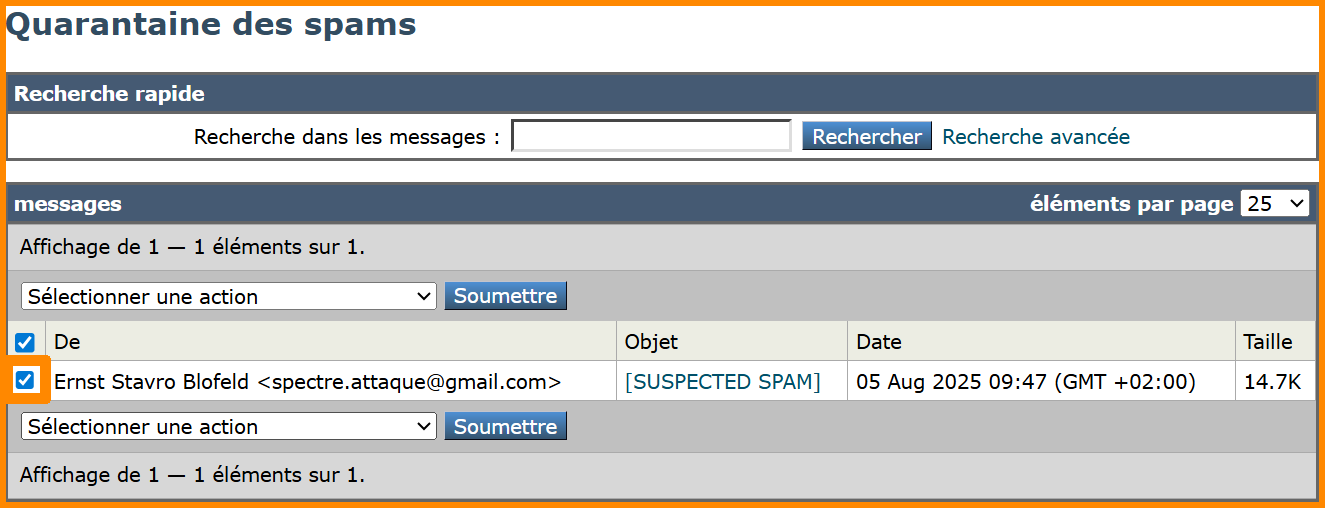
- **Sélectionnez le mail à gérer.**

[![spam5.png](https://portail.ac-reunion.fr/ladoclela/uploads/images/gallery/2025-08/scaled-1680-/spam5.png)](https://portail.ac-reunion.fr/ladoclela/uploads/images/gallery/2025-08/spam5.png)
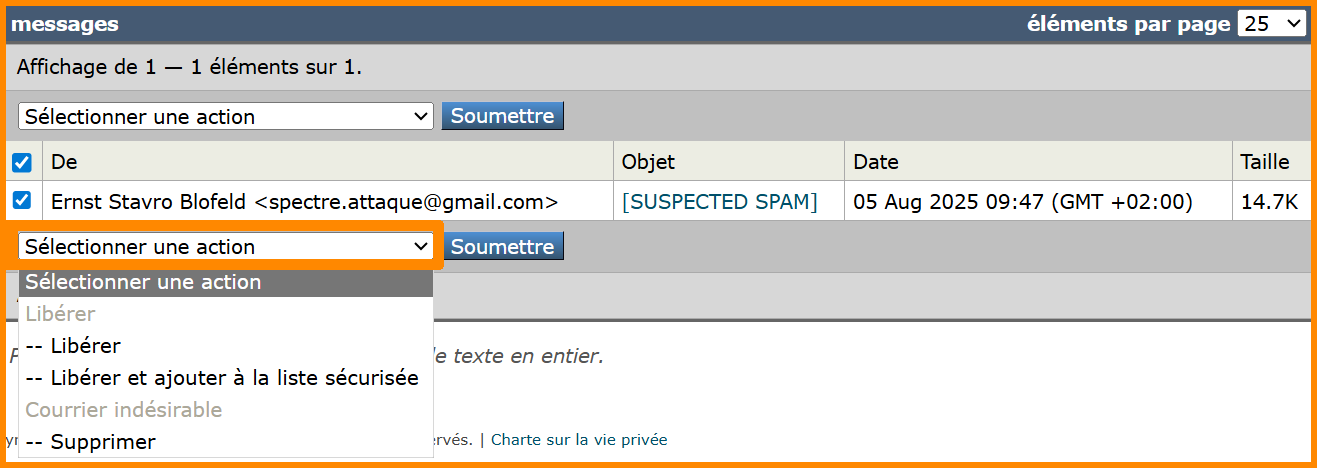
- **Cliquez sur la liste déroulante à gauche du bouton "Soumettre".**
- **Sélectionnez l'action à faire pour ce mail.**

<p class="callout info">**- Libérer** : ce mail de l’expéditeur sera visible dans votre boîte mail, mais l’expéditeur restera dans la liste des spams.  
**- Libérer et ajouter à la liste sécurisée :** ce mail sera visible dans votre boîte mail et l'expéditeur sera retiré de la liste des spams.  
**- Supprimer** : le mail sera supprimé et l’expéditeur restera dans la liste des spams.</p>

[![spam6.png](https://portail.ac-reunion.fr/ladoclela/uploads/images/gallery/2025-08/scaled-1680-/spam6.png)](https://portail.ac-reunion.fr/ladoclela/uploads/images/gallery/2025-08/spam6.png)

- **Cliquez sur le bouton "Soumettre".**

[![spam7.png](https://portail.ac-reunion.fr/ladoclela/uploads/images/gallery/2025-08/scaled-1680-/spam7.png)](https://portail.ac-reunion.fr/ladoclela/uploads/images/gallery/2025-08/spam7.png)
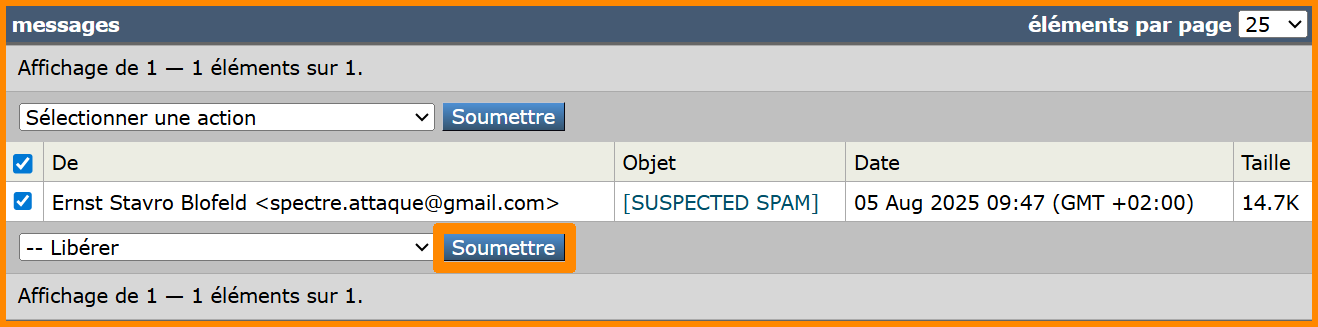
- **Une nouvelle fenêtre s'ouvre. Cliquez sur le second bouton.**

**[![spam8.png](https://portail.ac-reunion.fr/ladoclela/uploads/images/gallery/2025-08/scaled-1680-/spam8.png)](https://portail.ac-reunion.fr/ladoclela/uploads/images/gallery/2025-08/spam8.png)**
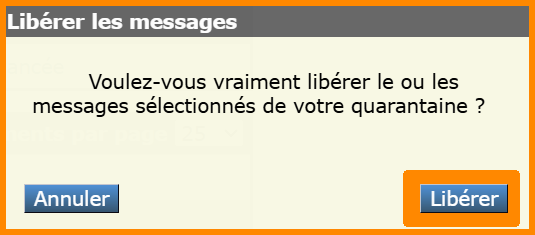
- **Effectuez cette action pour chaque courriel spam.**

</details>---

#### **Ajouter une adresse mail en spam depuis votre messagerie** 

<details id="bkmrk-ajouter-une-adresse--1"><summary>Ajouter une adresse mail en spam depuis votre messagerie</summary>

- **Sélectionnez le mail frauduleux ou douteux.**
- **En haut, cliquez sur "Spam".**

[![spam1.png](https://portail.ac-reunion.fr/ladoclela/uploads/images/gallery/2025-08/scaled-1680-/spam1.png)](https://portail.ac-reunion.fr/ladoclela/uploads/images/gallery/2025-08/spam1.png)
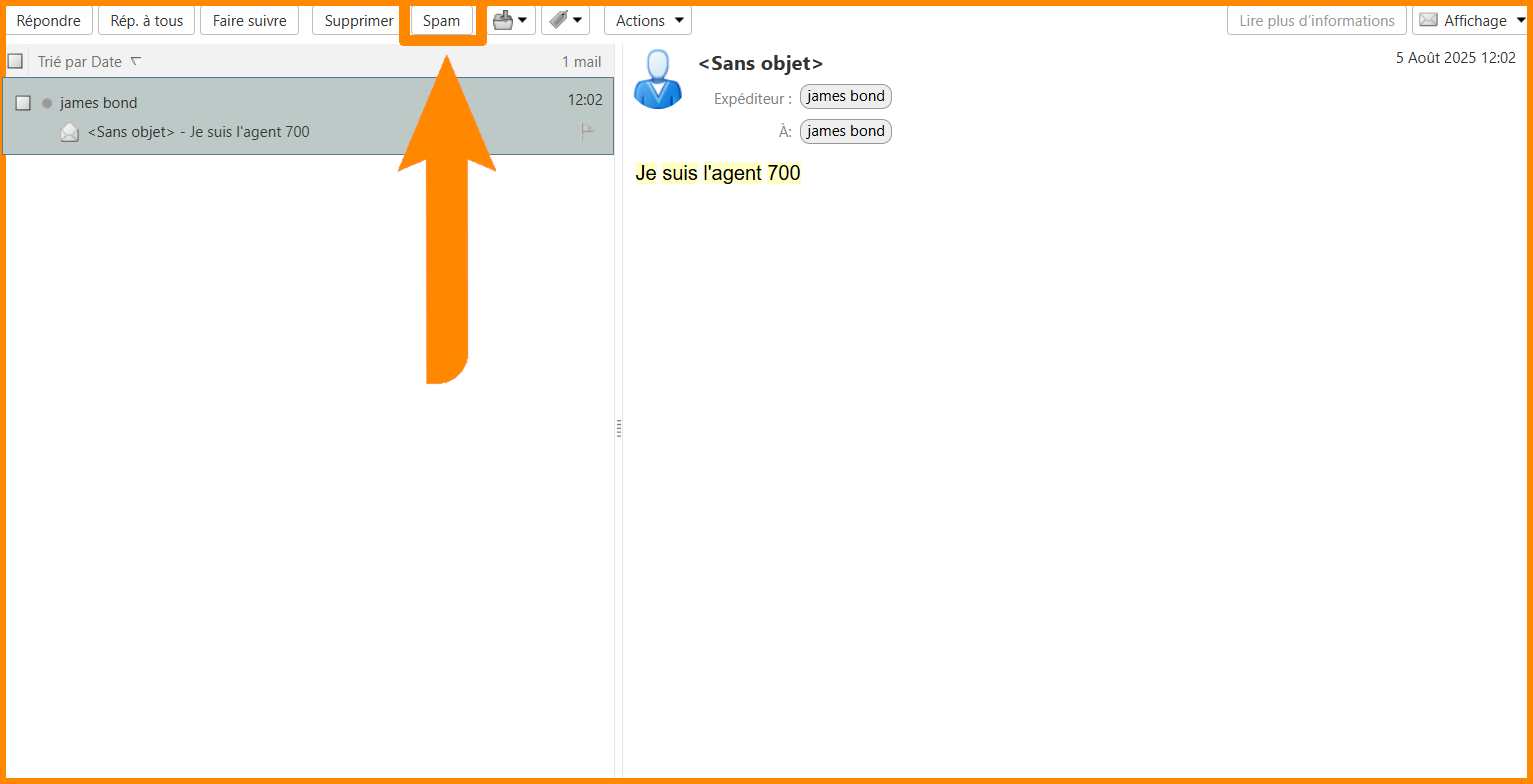
- **L'adresse e-mail est automatiquement enregistrée dans les spams.**

</details>---

#### **Accepter des adresses manuellement**

<details id="bkmrk-accepter-des-adresse-1"><summary>Accepter des adresses manuellement</summary>

- **En haut à gauche, cliquez sur "Préférences".**

[![imp2.png](https://portail.ac-reunion.fr/ladoclela/uploads/images/gallery/2025-07/scaled-1680-/imp2.png)](https://portail.ac-reunion.fr/ladoclela/uploads/images/gallery/2025-07/imp2.png)

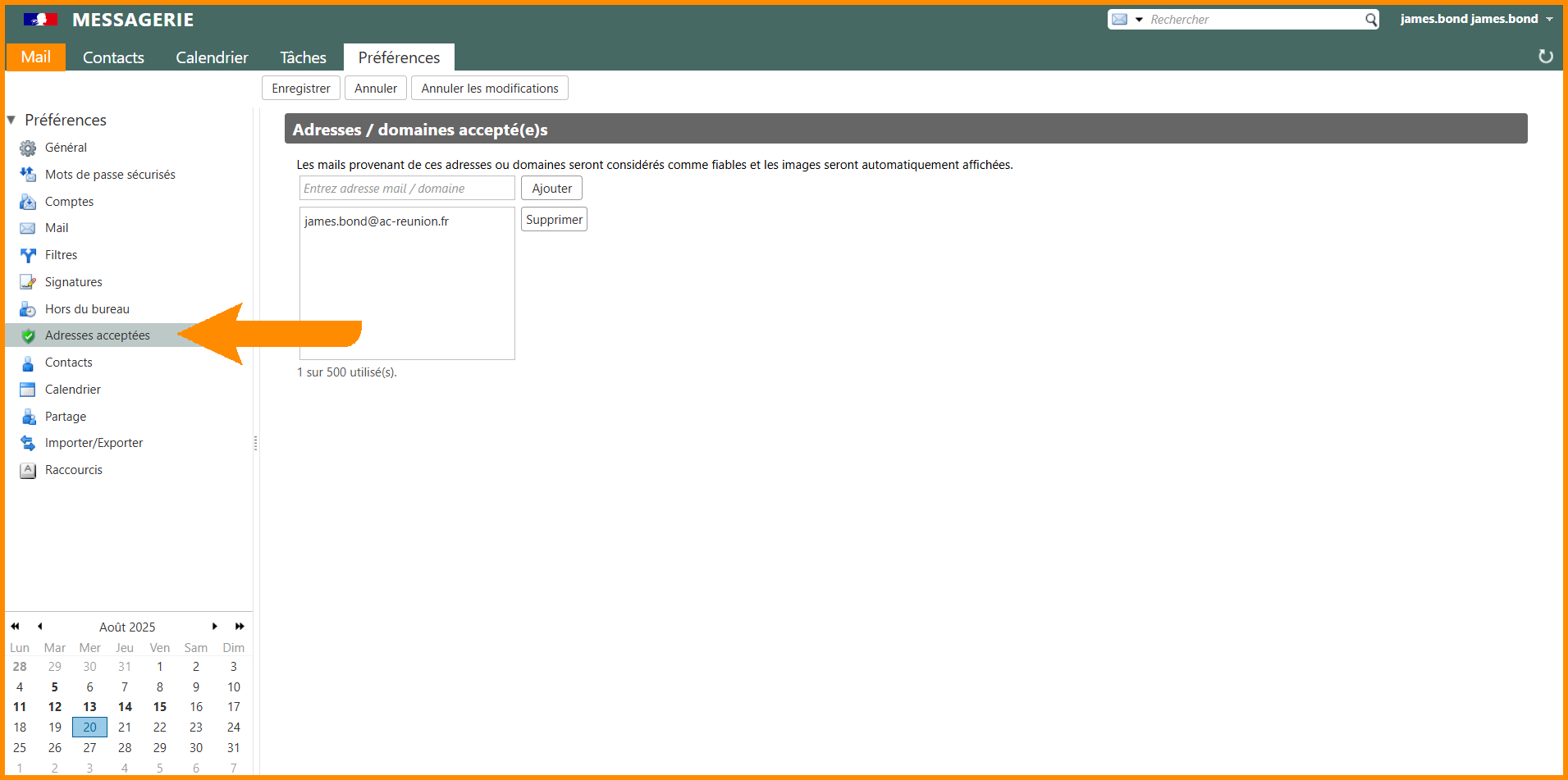
- **À gauche, cliquez sur "<sub>![icon_adresses_accepte.png](https://portail.ac-reunion.fr/ladoclela/uploads/images/gallery/2025-08/scaled-1680-/icon-adresses-accepte.png)</sub> Adresses acceptées".**

[![spam1.png](https://portail.ac-reunion.fr/ladoclela/uploads/images/gallery/2025-08/scaled-1680-/R2hspam1.png)](https://portail.ac-reunion.fr/ladoclela/uploads/images/gallery/2025-08/R2hspam1.png)

- **Dans le champ** "*Entrez adresse mail / domaine"***, inscrivez l'adresse mail sécurisée.**

[![spam2.png](https://portail.ac-reunion.fr/ladoclela/uploads/images/gallery/2025-08/scaled-1680-/sB9spam2.png)](https://portail.ac-reunion.fr/ladoclela/uploads/images/gallery/2025-08/sB9spam2.png)
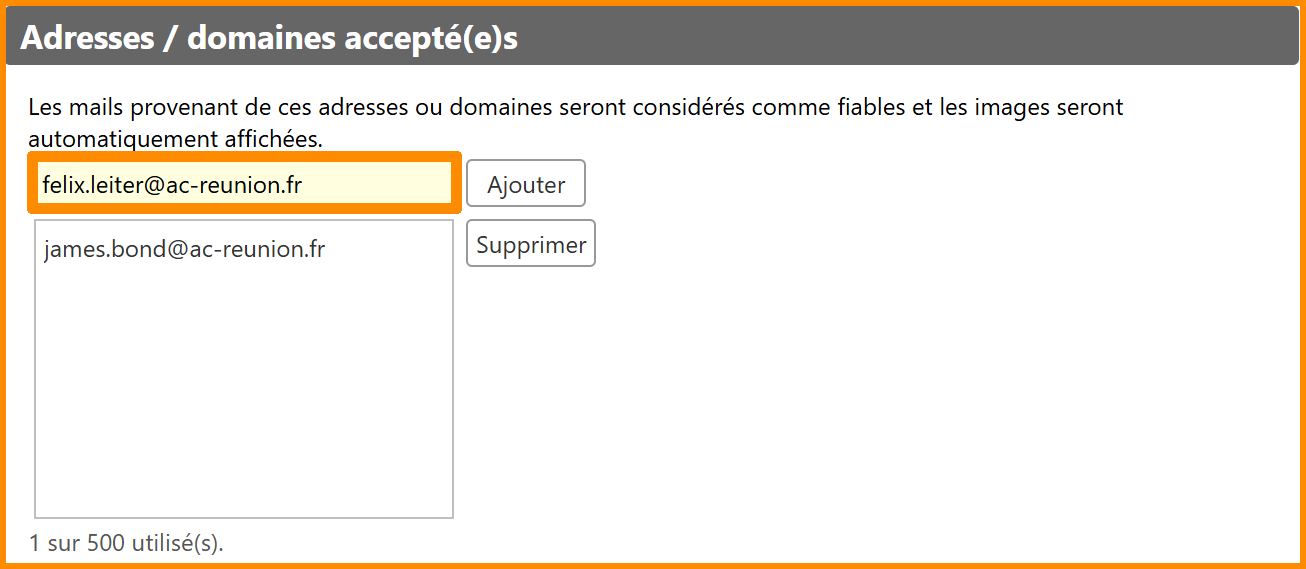
- **Cliquez sur "Ajouter".**
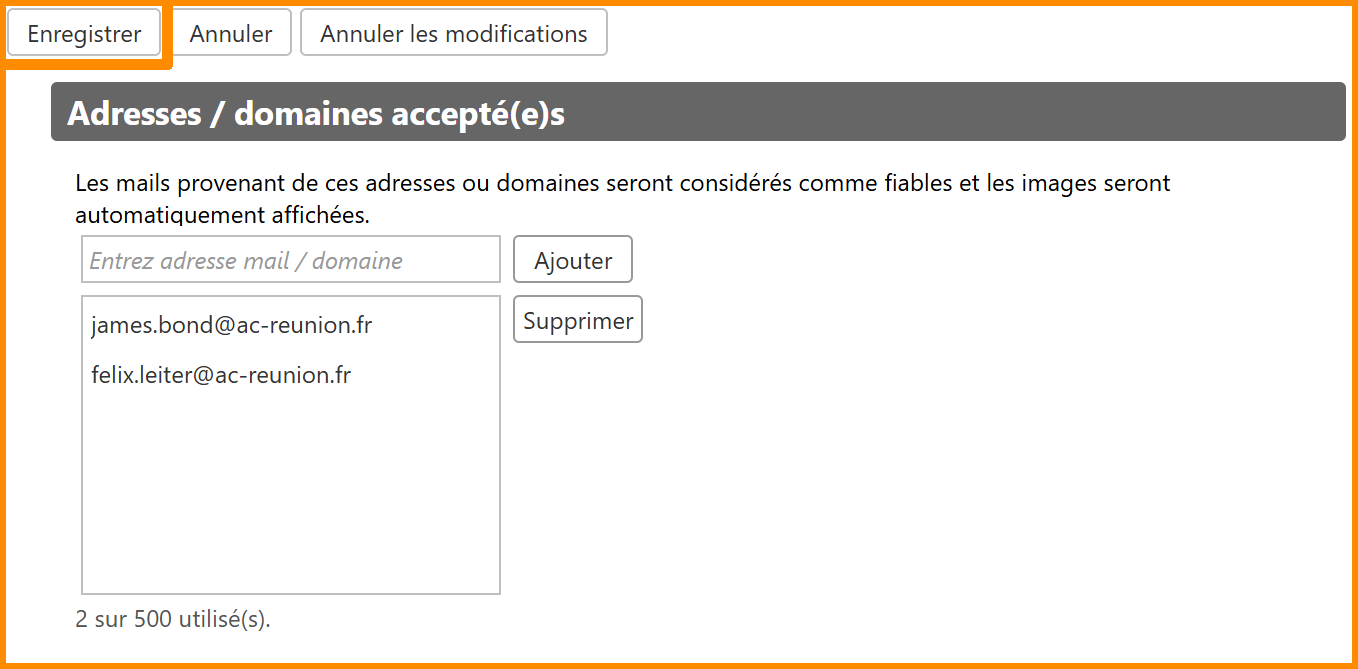
- **L'adresse mail s'affiche dans la liste des adresses acceptées.**
- **En haut à gauche, cliquez sur "Enregistrer".**

[![spam3.png](https://portail.ac-reunion.fr/ladoclela/uploads/images/gallery/2025-08/scaled-1680-/sXIspam3.png)](https://portail.ac-reunion.fr/ladoclela/uploads/images/gallery/2025-08/sXIspam3.png)
</details>---

#### **Limite d'envoi de messages**

<details id="bkmrk-limite-d%27envoi-de-me-1"><summary>Limite d'envoi de messages</summary>

Afin d'éviter toutes formes d'**usurpation de compte**, une **limite d'envoi de mails** est appliquée pour chaque utilisateur. Le décompte de messages active des seuils réparties en 3 catégories différentes :

<table border="1" class="align-center" style="border-collapse: collapse; width: 100%; height: 167.375px; border-width: 1px;"><colgroup><col style="width: 24.1335%;"></col><col style="width: 39.1574%;"></col><col style="width: 36.7091%;"></col></colgroup><tbody><tr style="height: 29.7969px;"><td style="border-color: rgb(0, 0, 0); border-style: none; height: 29.7969px;"> </td><td class="align-center" style="height: 29.7969px; background-color: rgb(230, 126, 35); border-color: rgb(0, 0, 0); border-style: solid;"><span style="color: rgb(236, 240, 241);">**WARN**</span></td><td class="align-center" style="height: 29.7969px; background-color: rgb(224, 62, 45); border-color: rgb(0, 0, 0); border-style: solid;"><span style="color: rgb(236, 240, 241);">**MAX**</span></td></tr><tr style="height: 68.5938px;"><td class="align-center" style="border-color: rgb(0, 0, 0); height: 68.5938px; background-color: rgb(53, 152, 219); vertical-align: middle;"><span style="color: rgb(255, 255, 255);">**EFFET**</span></td><td style="border-color: rgb(0, 0, 0); height: 68.5938px; vertical-align: middle;"><span style="color: rgb(0, 0, 0);">Les mails sont mis en **quarantaine** chez le destinataire.</span></td><td style="border-color: rgb(0, 0, 0); height: 68.5938px; vertical-align: middle;"><span style="color: rgb(0, 0, 0);">Le mail est **bloqué et supprimé** par le serveur</span></td></tr><tr style="height: 68.9844px;"><td class="align-center" style="border-color: rgb(0, 0, 0); height: 68.9844px; background-color: rgb(53, 152, 219); vertical-align: middle;"><span style="color: rgb(255, 255, 255);">**ACTIONS**</span></td><td style="border-color: rgb(0, 0, 0); height: 68.9844px; vertical-align: middle;"><span style="color: rgb(0, 0, 0);">Le destinataire peut débloquer le message s'il le considère comme légitime  
*(cf [documentation](https://portail.ac-reunion.fr/ladoclela/link/4234#bkmrk-g%C3%A9rer-ses-messages-e-1))*  
</span></td><td style="border-color: rgb(0, 0, 0); height: 68.9844px; vertical-align: middle;"><span style="color: rgb(0, 0, 0);">L'expéditeur doit attendre la fin de l'intervalle de temps indiqué ci dessous avant de renvoyer un mail.</span></td></tr></tbody></table>

Il existe une variable supplémentaire dans le décompte. Il se fait par adresse IP et par émetteur.

<span style="color: rgb(0, 0, 0);">**SEUILS DE TOLÉRANCE SELON L'ADRESSE IP**</span>

<table border="1" style="border-collapse: collapse; width: 100%; height: 178.594px; border: 1px solid rgb(0, 0, 0);"><colgroup><col style="width: 24.647%;"></col><col style="width: 38.7718%;"></col><col style="width: 36.5813%;"></col></colgroup><tbody><tr style="height: 29.7727px;"><td class="align-center" rowspan="2" style="height: 59.5738px; background-color: rgb(53, 152, 219); border-color: rgb(0, 0, 0); vertical-align: middle;"><span style="color: rgb(255, 255, 255);">**INTERVALLE DE TEMPS**</span></td><td class="align-center" colspan="2" style="height: 29.7727px; background-color: rgb(53, 152, 219); border-color: rgb(0, 0, 0);"><span style="color: rgb(255, 255, 255);">**NOMBRE DE MAILS COMPTÉS**</span></td></tr><tr style="height: 29.8011px;"><td class="align-center" style="height: 29.8011px; background-color: rgb(230, 126, 35); border-color: rgb(0, 0, 0); border-style: solid;"><span style="color: rgb(236, 240, 241);">**WARN**</span></td><td class="align-center" style="height: 29.8011px; background-color: rgb(224, 62, 45); border-color: rgb(0, 0, 0); border-style: solid;"><span style="color: rgb(236, 240, 241);">**MAX**</span></td></tr><tr style="height: 29.7727px;"><td class="align-center" style="height: 29.7727px; background-color: rgb(212, 230, 241); border-color: rgb(0, 0, 0);">**<span style="color: rgb(0, 0, 0);">1 min</span>**</td><td class="align-center" style="height: 29.7727px; border-color: rgb(0, 0, 0);"><span style="color: rgb(0, 0, 0);">500</span></td><td class="align-center" style="height: 29.7727px; border-color: rgb(0, 0, 0);"><span style="color: rgb(0, 0, 0);">700 et plus</span></td></tr><tr style="height: 29.7727px;"><td class="align-center" style="height: 29.7727px; background-color: rgb(212, 230, 241); border-color: rgb(0, 0, 0);">**<span style="color: rgb(0, 0, 0);">10 min</span>**</td><td class="align-center" style="height: 29.7727px; border-color: rgb(0, 0, 0);"><span style="color: rgb(0, 0, 0);">800</span></td><td class="align-center" style="height: 29.7727px; border-color: rgb(0, 0, 0);"><span style="color: rgb(0, 0, 0);">1000 et plus</span></td></tr><tr style="height: 29.7727px;"><td class="align-center" style="height: 29.7727px; background-color: rgb(212, 230, 241); border-color: rgb(0, 0, 0);">**<span style="color: rgb(0, 0, 0);">60 min</span>**</td><td class="align-center" style="height: 29.7727px; border-color: rgb(0, 0, 0);"><span style="color: rgb(0, 0, 0);">3000</span></td><td class="align-center" style="height: 29.7727px; border-color: rgb(0, 0, 0);"><span style="color: rgb(0, 0, 0);">6000 et plus</span></td></tr><tr style="height: 29.7017px;"><td class="align-center" style="height: 29.7017px; background-color: rgb(212, 230, 241); border-color: rgb(0, 0, 0);">**<span style="color: rgb(0, 0, 0);">600 min</span>**</td><td class="align-center" style="height: 29.7017px; border-color: rgb(0, 0, 0);"><span style="color: rgb(0, 0, 0);">6000</span></td><td class="align-center" style="height: 29.7017px; border-color: rgb(0, 0, 0);"><span style="color: rgb(0, 0, 0);">8000 et plus</span></td></tr></tbody></table>

<span style="color: rgb(0, 0, 0);">**SEUILS DE TOLÉRANCE SELON L'ÉMETTEUR**</span>

<table border="1" style="border-collapse: collapse; width: 100%; height: 178.781px; border: 1px solid rgb(0, 0, 0);"><colgroup><col style="width: 24.647%;"></col><col style="width: 38.7718%;"></col><col style="width: 36.5813%;"></col></colgroup><tbody><tr style="height: 29.7969px;"><td class="align-center" rowspan="2" style="height: 59.5938px; background-color: rgb(53, 152, 219); border-color: rgb(0, 0, 0); vertical-align: middle;"><span style="color: rgb(255, 255, 255);">**INTERVALLE DE TEMPS**</span></td><td class="align-center" colspan="2" style="height: 29.7969px; background-color: rgb(53, 152, 219); border-color: rgb(0, 0, 0);"><span style="color: rgb(255, 255, 255);">**NOMBRE DE MAILS COMPTÉS**</span></td></tr><tr style="height: 29.7969px;"><td class="align-center" style="height: 29.7969px; background-color: rgb(230, 126, 35); border-color: rgb(0, 0, 0); border-style: solid;"><span style="color: rgb(236, 240, 241);">**WARN**</span></td><td class="align-center" style="height: 29.7969px; background-color: rgb(224, 62, 45); border-color: rgb(0, 0, 0); border-style: solid;"><span style="color: rgb(236, 240, 241);">**MAX**</span></td></tr><tr style="height: 29.7969px;"><td class="align-center" style="height: 29.7969px; background-color: rgb(212, 230, 241); border-color: rgb(0, 0, 0);">**<span style="color: rgb(0, 0, 0);">1 min</span>**</td><td class="align-center" style="height: 29.7969px; border-color: rgb(0, 0, 0);"><span style="color: rgb(0, 0, 0);">500</span></td><td class="align-center" style="height: 29.7969px; border-color: rgb(0, 0, 0);"><span style="color: rgb(0, 0, 0);">2000 et plus</span></td></tr><tr style="height: 29.7969px;"><td class="align-center" style="height: 29.7969px; background-color: rgb(212, 230, 241); border-color: rgb(0, 0, 0);">**<span style="color: rgb(0, 0, 0);">10 min</span>**</td><td class="align-center" style="height: 29.7969px; border-color: rgb(0, 0, 0);"><span style="color: rgb(0, 0, 0);">800</span></td><td class="align-center" style="height: 29.7969px; border-color: rgb(0, 0, 0);"><span style="color: rgb(0, 0, 0);">2500 et plus</span></td></tr><tr style="height: 29.7969px;"><td class="align-center" style="height: 29.7969px; background-color: rgb(212, 230, 241); border-color: rgb(0, 0, 0);">**<span style="color: rgb(0, 0, 0);">60 min</span>**</td><td class="align-center" style="height: 29.7969px; border-color: rgb(0, 0, 0);"><span style="color: rgb(0, 0, 0);">2000</span></td><td class="align-center" style="height: 29.7969px; border-color: rgb(0, 0, 0);"><span style="color: rgb(0, 0, 0);">4000 et plus</span></td></tr><tr style="height: 29.7969px;"><td class="align-center" style="height: 29.7969px; background-color: rgb(212, 230, 241); border-color: rgb(0, 0, 0);">**<span style="color: rgb(0, 0, 0);">600 min</span>**</td><td class="align-center" style="height: 29.7969px; border-color: rgb(0, 0, 0);"><span style="color: rgb(0, 0, 0);">5000</span></td><td class="align-center" style="height: 29.7969px; border-color: rgb(0, 0, 0);"><span style="color: rgb(0, 0, 0);">8000 et plus</span></td></tr></tbody></table>

<span style="color: rgb(0, 0, 0);">**SEUILS DE TOLÉRANCE SELON L'HEURE**</span>

Les seuils sont différents selon si l'envoi du mail s'effectue en dehors des horaires du bureau défini entre 7h et 20h. Voici les spécificités selon si le message est envoyé :

<table border="1" style="border-collapse: collapse; width: 100%; height: 136.188px;"><colgroup><col style="width: 24.9037%;"></col><col style="width: 38.2542%;"></col><col style="width: 36.8421%;"></col></colgroup><tbody><tr style="height: 44.7969px;"><td class="align-center" style="height: 44.7969px; border-style: none; border-color: rgb(0, 0, 0); vertical-align: middle;">  
</td><td class="align-center" style="height: 44.7969px; background-color: rgb(53, 152, 219); border-color: rgb(0, 0, 0); vertical-align: middle;"><span style="color: rgb(255, 255, 255);">**JOUR DE LA SEMAINE**</span></td><td class="align-center" style="height: 44.7969px; background-color: rgb(53, 152, 219); border-color: rgb(0, 0, 0); vertical-align: middle;"><span style="color: rgb(255, 255, 255);">**WEEK-END**</span></td></tr><tr style="height: 44.7969px;"><td class="align-center" style="height: 44.7969px; border-color: rgb(0, 0, 0); background-color: rgb(53, 152, 219); vertical-align: middle;"><span style="color: rgb(255, 255, 255);">**HORAIRES DU BUREAU (7h à 20h)**</span></td><td class="align-center" style="height: 44.7969px; border-color: rgb(0, 0, 0); vertical-align: middle;"><span style="color: rgb(0, 0, 0);">Coefficient normal</span></td><td class="align-center" style="height: 44.7969px; border-color: rgb(0, 0, 0); vertical-align: middle;"><span style="color: rgb(0, 0, 0);">Seuil divisé par 2</span></td></tr><tr style="height: 46.5938px;"><td class="align-center" style="height: 46.5938px; border-color: rgb(0, 0, 0); background-color: rgb(53, 152, 219); vertical-align: middle;"><span style="color: rgb(255, 255, 255);">**EN DEHORS DES HORAIRES**</span></td><td class="align-center" colspan="2" style="height: 46.5938px; border-color: rgb(0, 0, 0); vertical-align: middle;"><span style="color: rgb(0, 0, 0);">Seuil divisé par 4</span>  
</td></tr></tbody></table>

*<span style="text-decoration: underline;">Exemple :</span> MAX sur 60 minutes = 8000 mails, mais réduit à 2000 en dehors des horaires du bureau.*

<span style="color: rgb(0, 0, 0);">**SEUILS DE TOLÉRANCE SELON LE PUBLIC**</span>

Les seuils peuvent être augmentés selon le profilage des expéditeurs comme :

- <span style="text-decoration: underline;">**L'expéditeur est un chef d'établissement :**</span> tolérance multipliée par 2
- <span style="text-decoration: underline;">**Messages depuis l'IP d'un établissement scolaire :**</span> tolérance multipliée par 4
- <span style="text-decoration: underline;">**Messages transmis par l'intermédiaire d'une liste de diffusion :**</span> aucune restriction

*<span style="text-decoration: underline;">Exemple :</span> MAX sur 60 minutes = 8000 mails, mais augmenté pour la secrétaire du collège Golden Eye à 32000 messages.*

<span style="color: rgb(0, 0, 0);">**COMPROMISSION D'UN COMPTE**</span>

Lorsqu’un compte dépasse l’un des seuils WARNING ou MAX, les responsables de la sécurité informatique sont notifiés afin de déterminer s’il s’agit d’une usurpation d’identité. En cas de compromission avérée, celle-ci est alors activée et le mot de passe de votre compte Métice est alors réinitialisé.

</details>---

<p class="callout success">**Félicitations, vous savez désormais comment configurer votre gestionnaire anti-spams !**</p>