# Envoyer un message / mail

Depuis l'application <sub>![logo_icon_xivo.png](https://portail.ac-reunion.fr/ladoclela/uploads/images/gallery/2025-09/scaled-1680-/logo-icon-xivo.png) </sub>XIVO, vous avez la possibilité de contacter vos correspondants par écrit, soit directement via la messagerie instantanée, soit en leur envoyant un e-mail.

<p class="callout warning">**L’envoi de messages instantanés et de courriels n’est possible qu’avec vos contacts figurant dans l’annuaire académique. Si le contact a été ajouté manuellement par vos soins, cette fonctionnalité n’est pas disponible.**</p>

#### **Envoyer un message instantané**

<details id="bkmrk-envoyer-un-message-i-1"><summary>Envoyer un message instantané</summary>

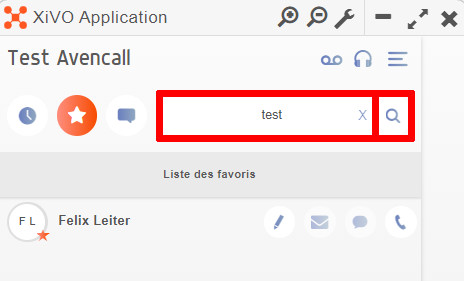
<table border="1" style="border-collapse: collapse; width: 100%; height: 1395.63px;"><colgroup><col style="width: 50.0642%;"></col><col style="width: 50.0642%;"></col></colgroup><tbody><tr style="height: 244.969px;"><td style="vertical-align: middle; height: 244.969px; border-style: none;">- **Dans le champ "NUMERO / NOM", recherchez votre contact.**
- **Cliquez sur "<sub>![logo_icon_rechercher.jpg](https://portail.ac-reunion.fr/ladoclela/uploads/images/gallery/2025-09/scaled-1680-/logo-icon-rechercher.jpg) </sub>Rechercher".**

</td><td style="vertical-align: middle; height: 244.969px; border-style: none;">[![xivo19.jpg](https://portail.ac-reunion.fr/ladoclela/uploads/images/gallery/2025-09/scaled-1680-/xivo19.jpg)](https://portail.ac-reunion.fr/ladoclela/uploads/images/gallery/2025-09/xivo19.jpg)

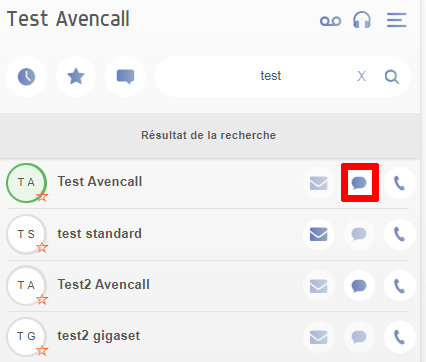
</td></tr><tr style="height: 335.922px;"><td style="vertical-align: middle; height: 335.922px; border-style: none;">- **À droite, cliquez sur "<sub>![logo_icon_message.png](https://portail.ac-reunion.fr/ladoclela/uploads/images/gallery/2025-09/scaled-1680-/logo-icon-message.png) </sub>Envoyer un message".**

</td><td style="vertical-align: middle; height: 335.922px; border-style: none;">[![xivo21.png](https://portail.ac-reunion.fr/ladoclela/uploads/images/gallery/2025-09/scaled-1680-/xivo21.png)](https://portail.ac-reunion.fr/ladoclela/uploads/images/gallery/2025-09/xivo21.png)

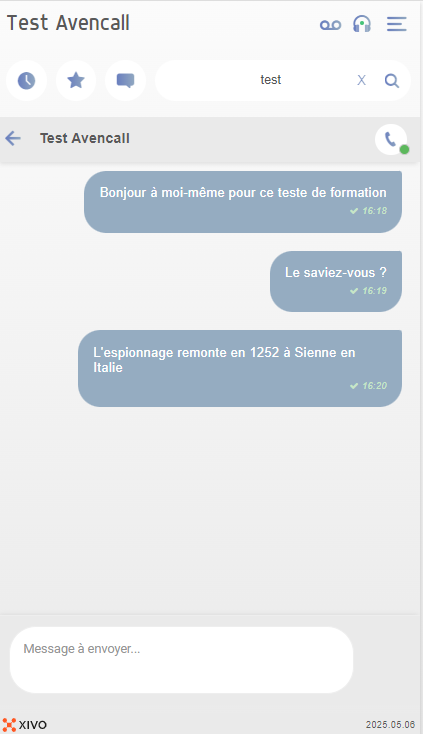
</td></tr><tr style="height: 665.75px;"><td style="vertical-align: middle; height: 665.75px; border-style: none;">- **Envoyer un message à votre destinataire.**

</td><td style="vertical-align: middle; height: 665.75px; border-style: none;">[![image.png](https://portail.ac-reunion.fr/ladoclela/uploads/images/gallery/2025-09/scaled-1680-/2qmimage.png)](https://portail.ac-reunion.fr/ladoclela/uploads/images/gallery/2025-09/2qmimage.png)

</td></tr></tbody></table>

</details>---

#### **Retrouver toutes ses discussions**

<details id="bkmrk-retrouver-toutes-ses-1"><summary>Retrouver toutes ses discussions</summary>

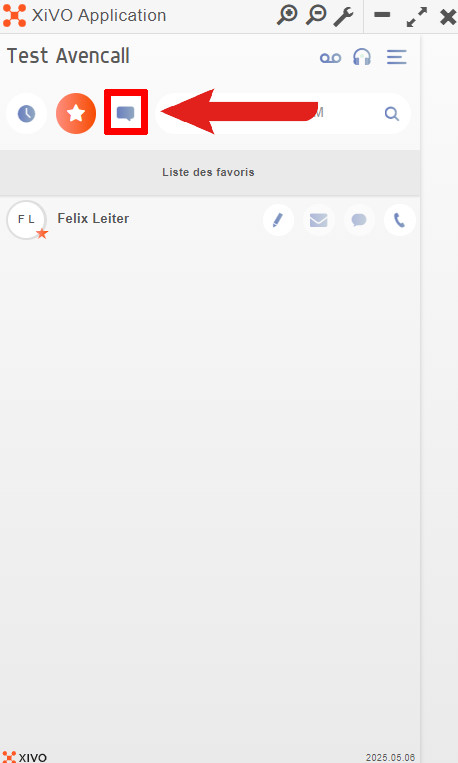
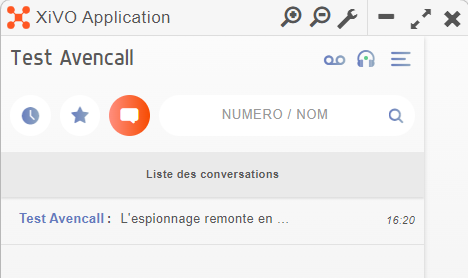
<table border="1" style="border-collapse: collapse; width: 100%;"><colgroup><col style="width: 50%;"></col><col style="width: 50%;"></col></colgroup><tbody><tr><td style="vertical-align: middle; border-style: none;">- **En haut à gauche, cliquez sur "<sub>![logo_icon_historique_mes.jpg](https://portail.ac-reunion.fr/ladoclela/uploads/images/gallery/2025-09/scaled-1680-/logo-icon-historique-mes.jpg)</sub> Historique de messagerie"**

</td><td style="vertical-align: middle; border-style: none;">[![xivo22.jpg](https://portail.ac-reunion.fr/ladoclela/uploads/images/gallery/2025-09/scaled-1680-/xivo22.jpg)](https://portail.ac-reunion.fr/ladoclela/uploads/images/gallery/2025-09/xivo22.jpg)

</td></tr><tr><td style="vertical-align: middle; border-style: none;">- **Retrouvez votre discussion avec votre interlocuteur.**

<p class="callout info">*S'il y a trop de discussions vous pouvez effectuer une recherche avec le champ "NUMERO / NOM" en haut à droite.*</p>

</td><td style="vertical-align: middle; border-style: none;">[![image.png](https://portail.ac-reunion.fr/ladoclela/uploads/images/gallery/2025-09/scaled-1680-/9lwimage.png)](https://portail.ac-reunion.fr/ladoclela/uploads/images/gallery/2025-09/9lwimage.png)

</td></tr></tbody></table>

</details>---

#### **Envoyer un mail**

<details id="bkmrk-envoyer-un-mail-dans"><summary>Envoyer un mail</summary>

<table border="1" style="border-collapse: collapse; width: 100%; height: 558.297px;"><colgroup><col style="width: 50.0642%;"></col><col style="width: 50.0642%;"></col></colgroup><tbody><tr style="height: 244.969px;"><td style="vertical-align: middle; height: 244.969px; border-style: none;">- **Dans le champ "NUMERO / NOM", recherchez votre contact.**
- **Cliquez sur "<sub>![logo_icon_rechercher.jpg](https://portail.ac-reunion.fr/ladoclela/uploads/images/gallery/2025-09/scaled-1680-/logo-icon-rechercher.jpg) </sub>Rechercher".**

</td><td style="vertical-align: middle; height: 244.969px; border-style: none;">[![xivo19.jpg](https://portail.ac-reunion.fr/ladoclela/uploads/images/gallery/2025-09/scaled-1680-/xivo19.jpg)](https://portail.ac-reunion.fr/ladoclela/uploads/images/gallery/2025-09/xivo19.jpg)

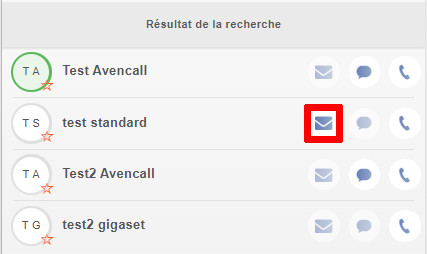
</td></tr><tr style="height: 240.859px;"><td style="vertical-align: middle; height: 240.859px; border-style: none;">- **À droite, cliquez sur "<sub>![logo_icon_mail.png](https://portail.ac-reunion.fr/ladoclela/uploads/images/gallery/2025-09/scaled-1680-/logo-icon-mail.png)</sub> Envoyer un mail".**

</td><td style="vertical-align: middle; height: 240.859px; border-style: none;">[![xivo23.jpg](https://portail.ac-reunion.fr/ladoclela/uploads/images/gallery/2025-09/scaled-1680-/xivo23.jpg)](https://portail.ac-reunion.fr/ladoclela/uploads/images/gallery/2025-09/xivo23.jpg)

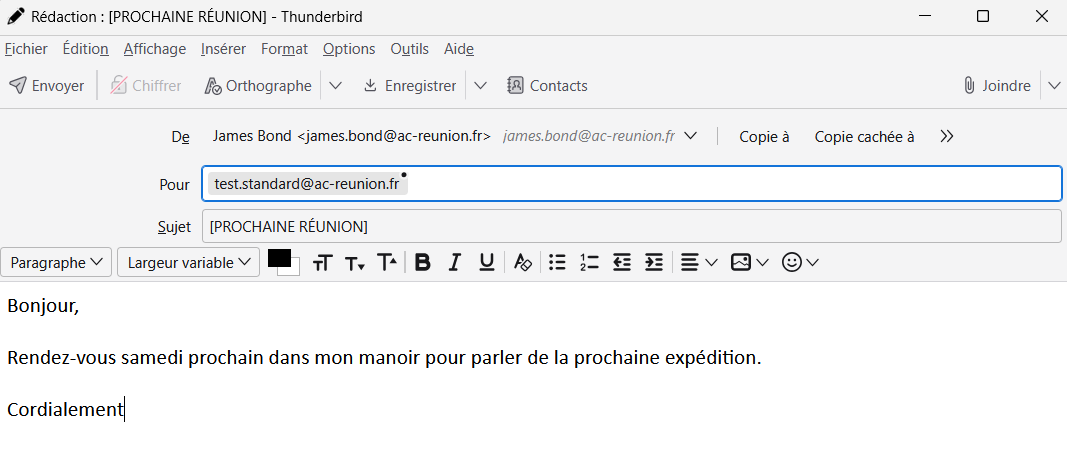
</td></tr><tr style="height: 72.4688px;"><td style="vertical-align: middle; border-style: none; height: 72.4688px;">- **Une application de boite mail s'ouvre.** *(ci-contre, <sub>![icon_thunderbird_td_TDBD](https://portail.ac-reunion.fr/ladoclela/uploads/images/gallery/2025-07/scaled-1680-/1024x1024-at-2x.png)</sub> Thunderbird)*

- **Écrivez et envoyez votre mail.**

</td><td style="vertical-align: middle; border-style: none; height: 72.4688px;">[![image.png](https://portail.ac-reunion.fr/ladoclela/uploads/images/gallery/2025-09/scaled-1680-/xGvimage.png)](https://portail.ac-reunion.fr/ladoclela/uploads/images/gallery/2025-09/xGvimage.png)

</td></tr></tbody></table>

</details>---

<p class="callout success">**Félicitations, vous savez désormais comment envoyer des messages ou des mails à vos contacts.**</p>