# Gérer ses appels

Dans cette section, nous allons découvrir toutes les fonctionnalités que l’application <sub>![logo_icon_xivo.png](https://portail.ac-reunion.fr/ladoclela/uploads/images/gallery/2025-09/scaled-1680-/logo-icon-xivo.png) </sub>XIVO offre lors de l’émission et de la réception d’appels téléphoniques.

##### **Connaitre le statut d'une personne**

<details id="bkmrk-connaitre-le-statut--1"><summary>Connaitre le statut d'une personne</summary>

<table border="1" style="border-collapse: collapse; width: 100%;"><colgroup><col style="width: 26.218%;"></col><col style="width: 73.9103%;"></col></colgroup><tbody><tr><td class="align-center" style="vertical-align: middle;">[![i8limage.png](https://portail.ac-reunion.fr/ladoclela/uploads/images/gallery/2026-04/scaled-1680-/S26i8limage.png)](https://portail.ac-reunion.fr/ladoclela/uploads/images/gallery/2026-04/S26i8limage.png)

</td><td class="align-center" style="vertical-align: middle;">**L'utilisateur est disponible**</td></tr><tr><td class="align-center" style="vertical-align: middle;">![xivo10.png](https://portail.ac-reunion.fr/ladoclela/uploads/images/gallery/2026-04/scaled-1680-/OeRxivo10.png)</td><td class="align-center" style="vertical-align: middle;">**L'utilisateur est en cours d'appel**</td></tr><tr><td class="align-center" style="vertical-align: middle;">![image.png](https://portail.ac-reunion.fr/ladoclela/uploads/images/gallery/2026-04/scaled-1680-/jjlimage.png)</td><td class="align-center" style="vertical-align: middle;">**L'utilisateur est mis en pause dans son appel**</td></tr><tr><td class="align-center" style="vertical-align: middle;">![image.png](https://portail.ac-reunion.fr/ladoclela/uploads/images/gallery/2026-04/scaled-1680-/85Vimage.png)</td><td class="align-center" style="vertical-align: middle;">**L'utilisateur est occupé avec un appel**</td></tr></tbody></table>

</details>---

#### **Appeler un numéro non enregistré**

<details id="bkmrk-appeler-un-num%C3%A9ro-no"><summary>Appeler un numéro non enregistré</summary>

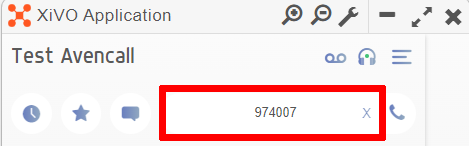
<table border="1" style="border-collapse: collapse; width: 100%; height: 328.406px;"><colgroup><col style="width: 50%;"></col><col style="width: 50%;"></col></colgroup><tbody><tr style="height: 134.656px;"><td style="border-style: none; vertical-align: middle; height: 134.656px;">- **Dans le champ "NUMERO / NOM", écrivez le numéro à appeler.**

</td><td style="border-style: none; vertical-align: middle; height: 134.656px;">[![xivo24.png](https://portail.ac-reunion.fr/ladoclela/uploads/images/gallery/2025-09/scaled-1680-/xivo24.png)](https://portail.ac-reunion.fr/ladoclela/uploads/images/gallery/2025-09/xivo24.png)  
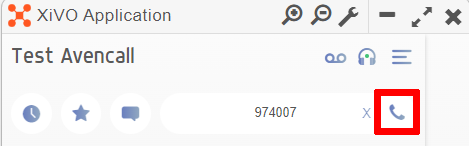
</td></tr><tr style="height: 134.656px;"><td style="border-style: none; vertical-align: middle; height: 134.656px;">- **À droite, cliquez sur "<sub>![logo_icon_appel.png](https://portail.ac-reunion.fr/ladoclela/uploads/images/gallery/2025-09/scaled-1680-/logo-icon-appel.png) </sub>Appeler".**

</td><td style="border-style: none; vertical-align: middle; height: 134.656px;">[![xivo25.png](https://portail.ac-reunion.fr/ladoclela/uploads/images/gallery/2025-09/scaled-1680-/xivo25.png)](https://portail.ac-reunion.fr/ladoclela/uploads/images/gallery/2025-09/xivo25.png)</td></tr><tr style="height: 29.2969px;"><td style="height: 29.7969px; vertical-align: middle; border-style: none;">- **L'appel se lance.**

</td><td style="height: 29.7969px; vertical-align: middle; border-style: none;">[![image.png](https://portail.ac-reunion.fr/ladoclela/uploads/images/gallery/2025-09/scaled-1680-/e5oimage.png)](https://portail.ac-reunion.fr/ladoclela/uploads/images/gallery/2025-09/e5oimage.png)

</td></tr></tbody></table>

</details>---

#### **Appeler un contact enregistré**

<details id="bkmrk-appeler-un-contact-d"><summary>Appeler un contact</summary>

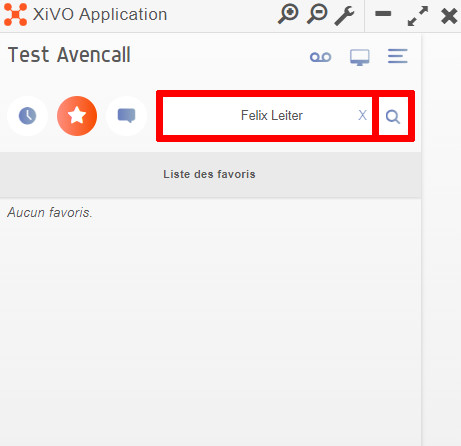
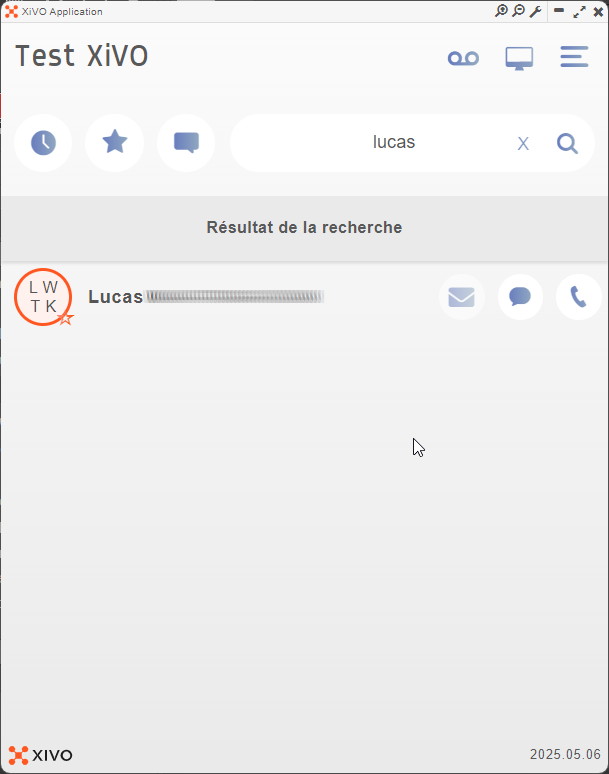
<table border="1" style="border-collapse: collapse; width: 100%; height: 119.188px;"><colgroup><col style="width: 49.9854%;"></col><col style="width: 49.9854%;"></col></colgroup><tbody><tr style="height: 29.7969px;"><td style="vertical-align: middle; border-style: none;">- **Dans le champ "NUMERO / NOM", recherchez votre contact.**
- **Cliquez sur "<sub>![logo_icon_rechercher.jpg](https://portail.ac-reunion.fr/ladoclela/uploads/images/gallery/2025-09/scaled-1680-/logo-icon-rechercher.jpg) </sub>Rechercher".**

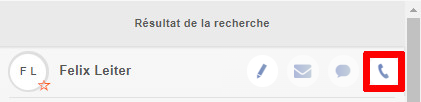
</td><td style="vertical-align: middle; border-style: none;">[![xivo9.jpg](https://portail.ac-reunion.fr/ladoclela/uploads/images/gallery/2025-09/scaled-1680-/xivo9.jpg)](https://portail.ac-reunion.fr/ladoclela/uploads/images/gallery/2025-09/xivo9.jpg)</td></tr><tr style="height: 29.7969px;"><td style="vertical-align: middle; border-style: none;">- **Tous les contacts similaires à votre recherche apparaissent.**
- **Cliquez sur "<sub>![logo_icon_appel.png](https://portail.ac-reunion.fr/ladoclela/uploads/images/gallery/2025-09/scaled-1680-/logo-icon-appel.png) </sub>Appeler" à côté de votre contact.**

</td><td class="align-left" style="vertical-align: middle; border-style: none;">[![xivo30.png](https://portail.ac-reunion.fr/ladoclela/uploads/images/gallery/2025-09/scaled-1680-/xivo30.png)](https://portail.ac-reunion.fr/ladoclela/uploads/images/gallery/2025-09/xivo30.png)

</td></tr><tr style="height: 29.7969px;"><td style="height: 29.7969px; vertical-align: middle; border-style: none;">- **L'appel se lance.**

</td><td style="height: 29.7969px; vertical-align: middle; border-style: none;">[![image.png](https://portail.ac-reunion.fr/ladoclela/uploads/images/gallery/2025-09/scaled-1680-/e5oimage.png)](https://portail.ac-reunion.fr/ladoclela/uploads/images/gallery/2025-09/e5oimage.png)

</td></tr></tbody></table>

</details>---

#### **Recevoir un appel**

<details id="bkmrk-recevoir-un-appel-lo"><summary>Recevoir un appel</summary>

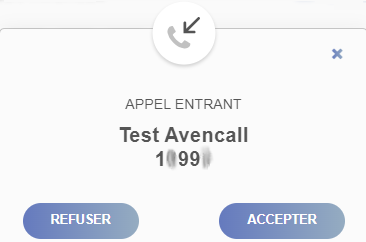
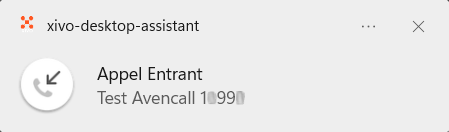
**Lorsqu'une personne essaye de vous contacter, vous recevez deux types de notifications différentes.**

<table border="1" style="border-collapse: collapse; width: 100%; height: 326.86px;"><colgroup><col style="width: 50%;"></col><col style="width: 50%;"></col></colgroup><tbody><tr style="height: 34.2344px;"><td class="align-center" style="height: 34.2344px; vertical-align: middle; background-color: rgb(53, 152, 219); border-color: rgb(0, 0, 0); border-style: solid;"><span style="color: rgb(255, 255, 255);">**UNE POP-UP SUR L'APPLICATION <sub>![logo_icon_xivo.png](https://portail.ac-reunion.fr/ladoclela/uploads/images/gallery/2025-09/scaled-1680-/logo-icon-xivo.png) </sub>XIVO**</span></td><td class="align-center" style="height: 34.2344px; vertical-align: middle; background-color: rgb(53, 152, 219); border-color: rgb(0, 0, 0); border-style: solid;"><span style="color: rgb(255, 255, 255);">**UNE POP-UP SUR VOTRE ORDINATEUR**</span></td></tr><tr style="height: 261.391px; border-style: none;"><td class="align-center" style="height: 261.391px; vertical-align: middle; border-color: rgb(0, 0, 0); border-style: solid;">[![xivo27.png](https://portail.ac-reunion.fr/ladoclela/uploads/images/gallery/2025-09/scaled-1680-/A2xxivo27.png)](https://portail.ac-reunion.fr/ladoclela/uploads/images/gallery/2025-09/A2xxivo27.png)

</td><td class="align-center" style="height: 261.391px; vertical-align: middle; border-color: rgb(0, 0, 0); border-style: solid;">[![xivo26.png](https://portail.ac-reunion.fr/ladoclela/uploads/images/gallery/2025-09/scaled-1680-/xUgxivo26.png)](https://portail.ac-reunion.fr/ladoclela/uploads/images/gallery/2025-09/xUgxivo26.png)

</td></tr><tr style="height: 31.2344px; border-style: none;"><td class="align-center" style="height: 31.2344px; vertical-align: middle; border-color: rgb(0, 0, 0); border-style: solid;">**Cliquez sur "ACCEPTER" pour répondre à l'appel.**</td><td class="align-center" style="height: 31.2344px; vertical-align: middle; border-color: rgb(0, 0, 0); border-style: solid;">**Cliquez dessus et l'application <sub>![logo_icon_xivo.png](https://portail.ac-reunion.fr/ladoclela/uploads/images/gallery/2025-09/scaled-1680-/logo-icon-xivo.png) </sub>XIVO s'ouvrira automatiquement.**</td></tr></tbody></table>

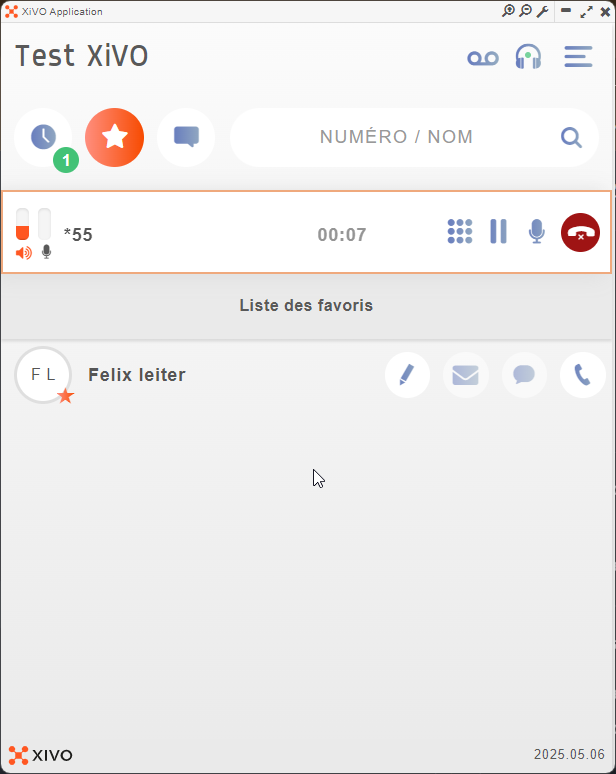
**Une fois l'appel accepté, vous avez plusieurs fonctionnalités utilisables durant l'appel.**

[![xivo28.png](https://portail.ac-reunion.fr/ladoclela/uploads/images/gallery/2025-09/scaled-1680-/xivo28.png)](https://portail.ac-reunion.fr/ladoclela/uploads/images/gallery/2025-09/xivo28.png)

- **<sub>![logo_icon_clavier.png](https://portail.ac-reunion.fr/ladoclela/uploads/images/gallery/2025-09/scaled-1680-/logo-icon-clavier.png)</sub> <span style="text-decoration: underline;">Clavier :</span>** Accès au pavé numérique pour écrire des chiffres
- **<sub>![logo_icon_pause.png](https://portail.ac-reunion.fr/ladoclela/uploads/images/gallery/2025-09/scaled-1680-/logo-icon-pause.png)</sub> <span style="text-decoration: underline;">Mettre en attente :</span>** Couper votre casque ET votre micro
- **<sub>![logo_icon_micro.png](https://portail.ac-reunion.fr/ladoclela/uploads/images/gallery/2025-09/scaled-1680-/logo-icon-micro.png)</sub> <span style="text-decoration: underline;">Désactiver le micro :</span>** Couper seulement votre micro
- **<sub>![logo_icon_raccrocher.png](https://portail.ac-reunion.fr/ladoclela/uploads/images/gallery/2025-09/scaled-1680-/logo-icon-raccrocher.png)</sub> <span style="text-decoration: underline;">Raccrocher :</span>** Mets fin à l'appel

</details>---

#### **Recevoir un double appel**

<details id="bkmrk-recevoir-un-double-a-1"><summary>Recevoir un double appel</summary>

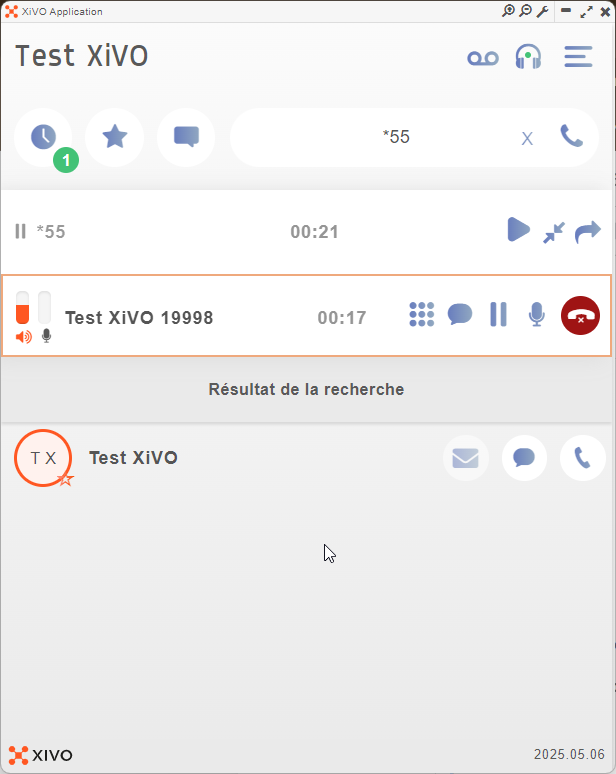
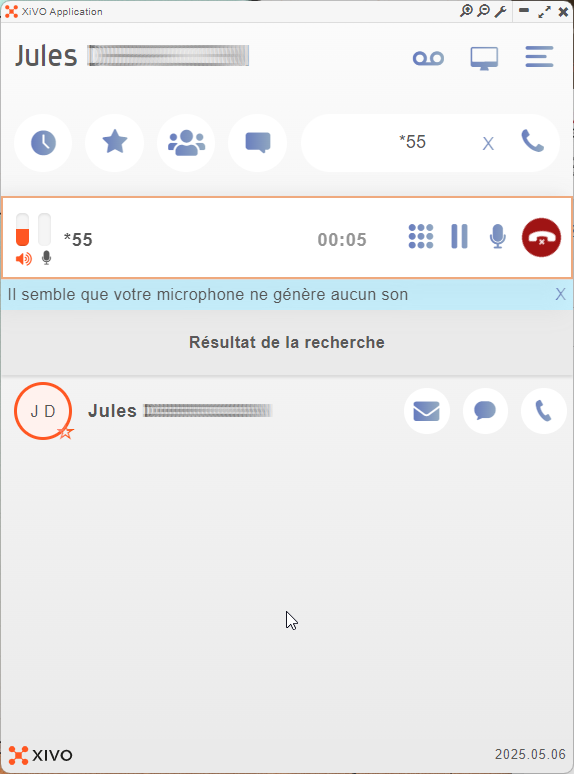
<table border="1" style="border-collapse: collapse; width: 99.9487%; height: 1642.04px;"><colgroup><col style="width: 50.0521%;"></col><col style="width: 50.0521%;"></col></colgroup><tbody><tr style="height: 487.612px;"><td style="height: 487.612px; vertical-align: middle; border-color: rgb(255, 255, 255);">- **Vous êtes déjà en appel avec une première personne.**

</td><td style="height: 487.612px; vertical-align: middle; border-color: rgb(255, 255, 255);">[![image.png](https://portail.ac-reunion.fr/ladoclela/uploads/images/gallery/2026-04/scaled-1680-/ZZcimage.png)](https://portail.ac-reunion.fr/ladoclela/uploads/images/gallery/2026-04/ZZcimage.png)

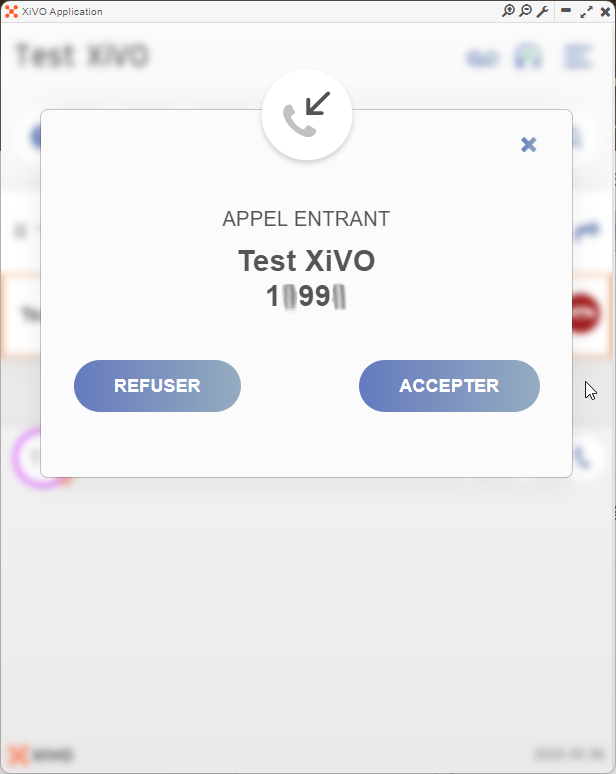
</td></tr><tr style="height: 487.612px;"><td style="height: 487.612px; vertical-align: middle; border-color: rgb(255, 255, 255);">- **Vous avez un appel entrant ou vous souhaitez effectuer un second appel.**
- **Acceptez l'appel.**

</td><td style="height: 487.612px; vertical-align: middle; border-color: rgb(255, 255, 255);">[![xivo11.png](https://portail.ac-reunion.fr/ladoclela/uploads/images/gallery/2026-04/scaled-1680-/xivo11.png)](https://portail.ac-reunion.fr/ladoclela/uploads/images/gallery/2026-04/xivo11.png)

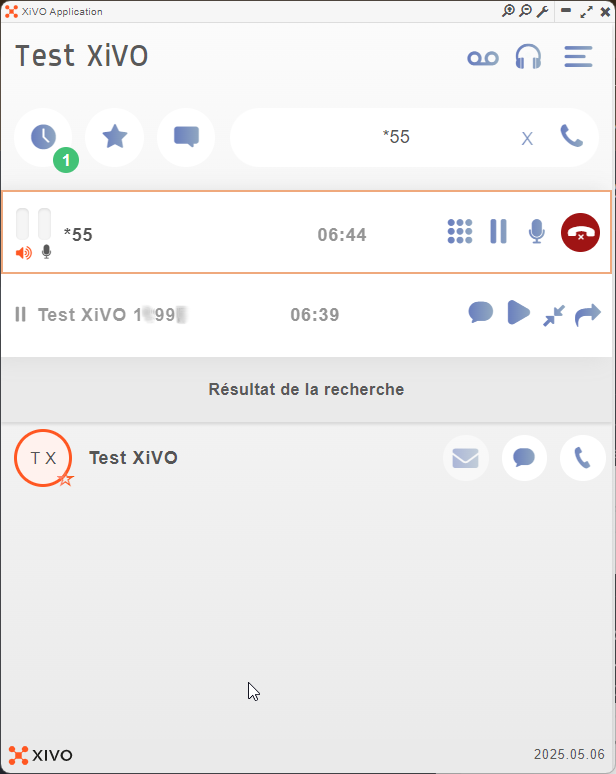
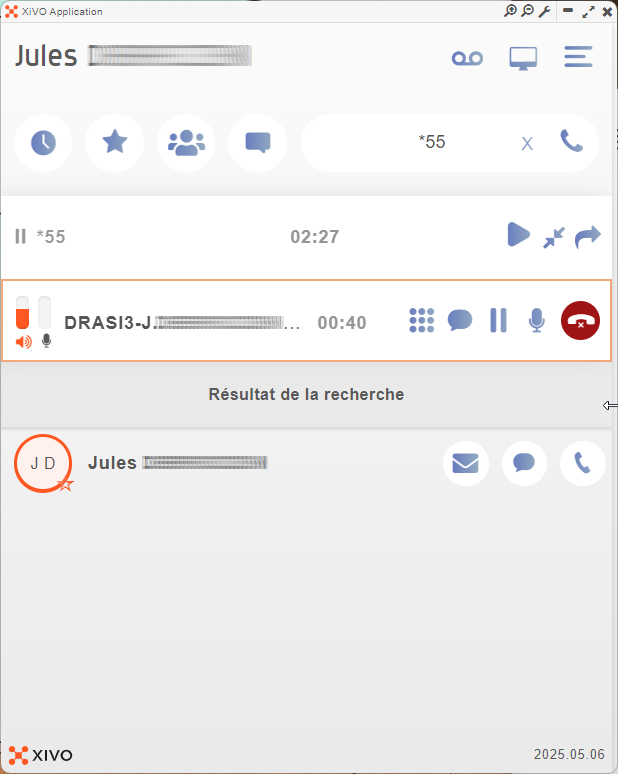
</td></tr><tr style="height: 487.612px;"><td style="height: 487.612px; vertical-align: middle; border-color: rgb(255, 255, 255);">- **Vous êtes en appel avec la seconde personne.**

  
</td><td style="height: 487.612px; vertical-align: middle; border-color: rgb(255, 255, 255);">[![image.png](https://portail.ac-reunion.fr/ladoclela/uploads/images/gallery/2026-04/scaled-1680-/Nxgimage.png)](https://portail.ac-reunion.fr/ladoclela/uploads/images/gallery/2026-04/Nxgimage.png)

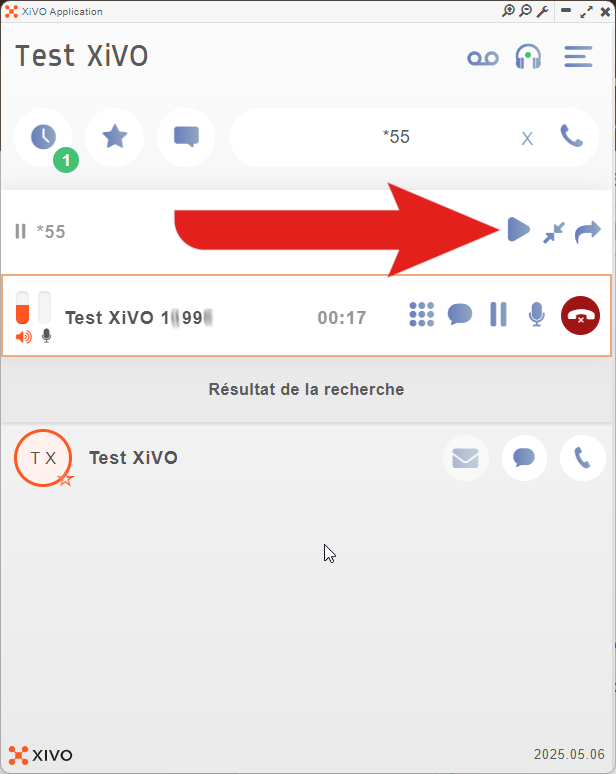
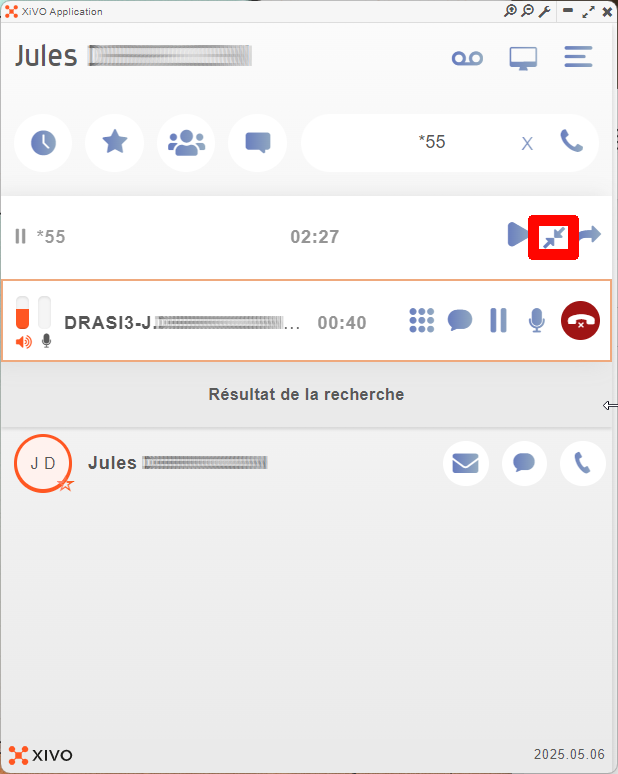
</td></tr><tr style="height: 44.8px;"><td style="height: 44.8px; vertical-align: middle; border-color: rgb(255, 255, 255);">- **Pour repasser au premier appel, appuyez sur le bouton "<sub>![icon_xivo_pause.png](https://portail.ac-reunion.fr/ladoclela/uploads/images/gallery/2026-04/scaled-1680-/icon-xivo-pause.png)</sub>Reprendre".**

</td><td style="height: 44.8px; vertical-align: middle; border-color: rgb(255, 255, 255);">[![xivo13.png](https://portail.ac-reunion.fr/ladoclela/uploads/images/gallery/2026-04/scaled-1680-/xivo13.png)](https://portail.ac-reunion.fr/ladoclela/uploads/images/gallery/2026-04/xivo13.png)

</td></tr><tr style="height: 44.8px;"><td style="height: 44.8px; vertical-align: middle; border-color: rgb(255, 255, 255);">- **Vous êtes repassés au premier appel.**

</td><td style="height: 44.8px; vertical-align: middle; border-color: rgb(255, 255, 255);">[![xivo14.png](https://portail.ac-reunion.fr/ladoclela/uploads/images/gallery/2026-04/scaled-1680-/xivo14.png)](https://portail.ac-reunion.fr/ladoclela/uploads/images/gallery/2026-04/xivo14.png)</td></tr></tbody></table>

- **Vous pouvez ainsi de suite passer d'un appel à l'autre en appuyant sur le bouton "<sub>![icon_xivo_pause.png](https://portail.ac-reunion.fr/ladoclela/uploads/images/gallery/2026-04/scaled-1680-/icon-xivo-pause.png)</sub>Reprendre".**

</details>---

#### **Gérer son historique d'appel**


<details id="bkmrk-g%C3%A9rer-son-historique"><summary>Gérer son historique d'appel</summary>

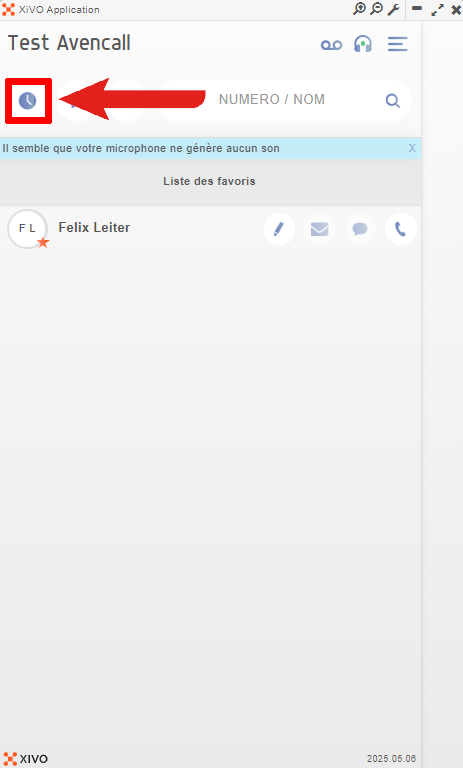
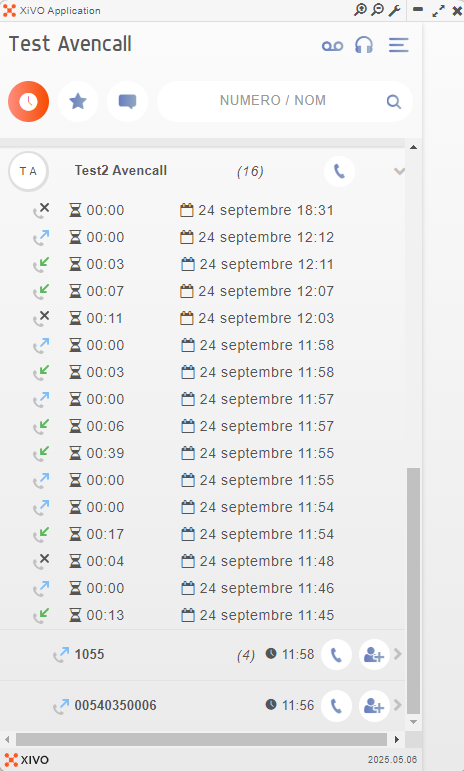
<table border="1" style="border-collapse: collapse; width: 100%; height: 1513.99px;"><colgroup><col style="width: 50%;"></col><col style="width: 50%;"></col></colgroup><tbody><tr style="height: 637.266px;"><td style="height: 637.266px; vertical-align: middle; border-style: none;">- **En haut à gauche, cliquez sur "<sub>![logo_icon_historique.png](https://portail.ac-reunion.fr/ladoclela/uploads/images/gallery/2025-09/scaled-1680-/logo-icon-historique.png)</sub> Historique des appels".**

</td><td style="height: 637.266px; border-style: none;">[![xivo29.png](https://portail.ac-reunion.fr/ladoclela/uploads/images/gallery/2025-09/scaled-1680-/xivo29.png)](https://portail.ac-reunion.fr/ladoclela/uploads/images/gallery/2025-09/xivo29.png)

</td></tr><tr style="height: 638.344px;"><td style="height: 638.344px; vertical-align: middle; border-style: none;">**Voici toutes la légende :**

- ![logo_icon_appel_emis.png](https://portail.ac-reunion.fr/ladoclela/uploads/images/gallery/2025-09/scaled-1680-/logo-icon-appel-emis.png) appel émis
- ![logo_icon_appel_recu.png](https://portail.ac-reunion.fr/ladoclela/uploads/images/gallery/2025-09/scaled-1680-/logo-icon-appel-recu.png) appel reçu
- ![logo_icon_appel_refus.png](https://portail.ac-reunion.fr/ladoclela/uploads/images/gallery/2025-09/scaled-1680-/logo-icon-appel-refus.png) appel perdu
- ![logo_icon_date.png](https://portail.ac-reunion.fr/ladoclela/uploads/images/gallery/2025-09/scaled-1680-/logo-icon-date.png) date et heure de l'appel
- ![logo_icon_temps.png](https://portail.ac-reunion.fr/ladoclela/uploads/images/gallery/2025-09/scaled-1680-/logo-icon-temps.png) durée de l'appel
- ![logo_icon_ajout_contact.png](https://portail.ac-reunion.fr/ladoclela/uploads/images/gallery/2025-09/scaled-1680-/logo-icon-ajout-contact.png) ajouter dans les contacts
- ![logo_icon_appel.png](https://portail.ac-reunion.fr/ladoclela/uploads/images/gallery/2025-09/scaled-1680-/1kQlogo-icon-appel.png) rappeler la personne

</td><td style="height: 638.344px; border-style: none;">[![image.png](https://portail.ac-reunion.fr/ladoclela/uploads/images/gallery/2025-09/scaled-1680-/uSFimage.png)](https://portail.ac-reunion.fr/ladoclela/uploads/images/gallery/2025-09/uSFimage.png)

</td></tr></tbody></table>

</details>---

#### **Activer/Désactiver sa messagerie vocale**

<details id="bkmrk-activer%2Fd%C3%A9sactiver-s-1"><summary>Activer/Désactiver sa messagerie vocale</summary>

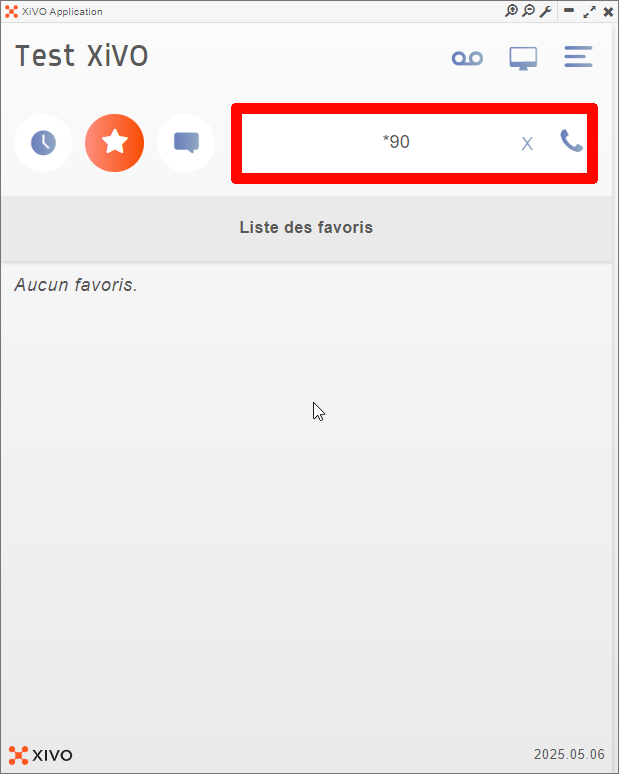
<table border="1" style="border-collapse: collapse; width: 100%; height: 199.297px;"><colgroup><col style="width: 50%;"></col><col style="width: 50%;"></col></colgroup><tbody><tr style="height: 109.906px;"><td class="align-left" style="height: 109.906px; vertical-align: middle; border-color: rgb(255, 255, 255); border-style: none;">- **En haut à droite dans la barre de recherche, appelez le numéro `*90`.**

</td><td class="align-left" style="height: 109.906px; vertical-align: middle; border-color: rgb(255, 255, 255); border-style: none;">[![xiv1.png](https://portail.ac-reunion.fr/ladoclela/uploads/images/gallery/2026-04/scaled-1680-/xiv1.png)](https://portail.ac-reunion.fr/ladoclela/uploads/images/gallery/2026-04/xiv1.png)

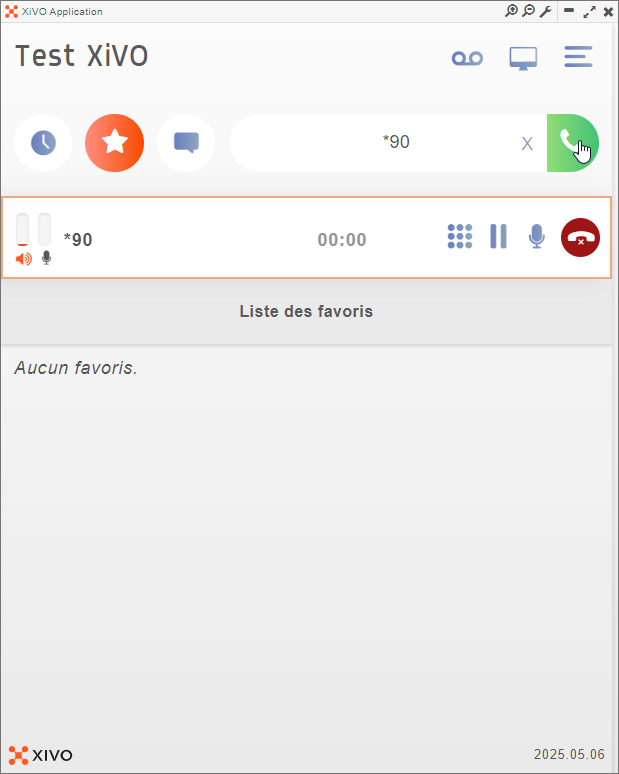
</td></tr><tr style="height: 29.7969px;"><td class="align-left" style="height: 29.7969px; vertical-align: middle; border-color: rgb(255, 255, 255); border-style: none;">- **Vous entendrez l'une des deux phrases suivantes :**
    - "votre messagerie a été désactivée"
    - "votre messagerie a été activée"

</td><td class="align-left" style="height: 29.7969px; vertical-align: middle; border-color: rgb(255, 255, 255); border-style: none;">[![image.png](https://portail.ac-reunion.fr/ladoclela/uploads/images/gallery/2026-04/scaled-1680-/cvcimage.png)](https://portail.ac-reunion.fr/ladoclela/uploads/images/gallery/2026-04/cvcimage.png)

</td></tr></tbody></table>

</details>---

#### **Accéder à votre messagerie vocale**

<details id="bkmrk-en-haut-%C3%A0-droite-dan"><summary>Accéder à votre messagerie vocale</summary>

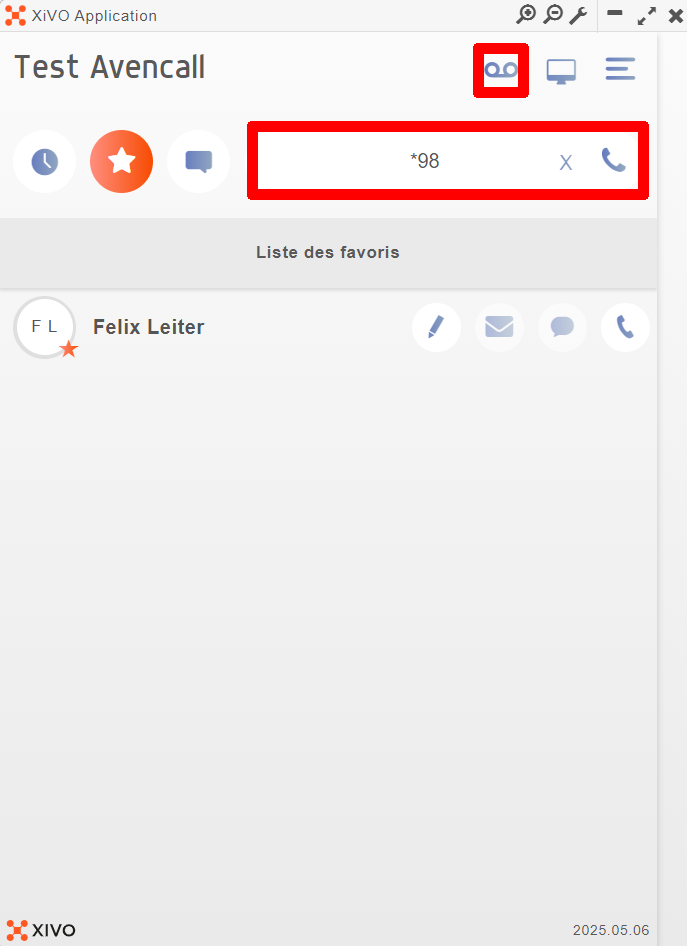
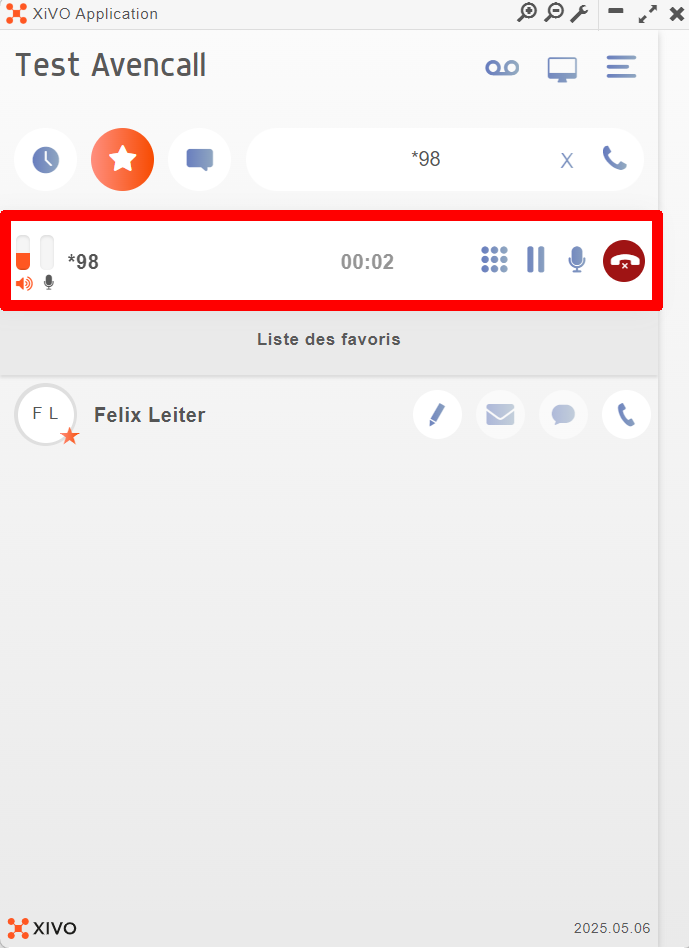
<table border="1" style="border-collapse: collapse; width: 100%; height: 692.734px; border-width: 1px; border-style: none;"><colgroup><col style="width: 50.0642%;"></col><col style="width: 50.0642%;"></col></colgroup><tbody><tr style="height: 533.312px;"><td style="vertical-align: middle; height: 533.312px; border-style: none;">- **En haut à droite dans la barre de recherche, appelez le numéro `*98`.  
      
    OU
- **Cliquez sur le symbole "<sub>![logo_icon_xivo_vocal.jpg](https://portail.ac-reunion.fr/ladoclela/uploads/images/gallery/2025-10/scaled-1680-/logo-icon-xivo-vocal.jpg)</sub> Boîte vocale".**

</td><td style="vertical-align: middle; height: 533.312px; border-style: none;">[![xivo42.png](https://portail.ac-reunion.fr/ladoclela/uploads/images/gallery/2025-10/scaled-1680-/xivo42.png)](https://portail.ac-reunion.fr/ladoclela/uploads/images/gallery/2025-10/xivo42.png)

</td></tr><tr style="height: 70.0312px;"><td style="height: 70.0312px; vertical-align: middle; border-style: none;">- **Durant votre appel, gérer vos messages vocaux.**

</td><td style="height: 70.0312px; border-style: none;">[![xivo43.png](https://portail.ac-reunion.fr/ladoclela/uploads/images/gallery/2025-10/scaled-1680-/xivo43.png)](https://portail.ac-reunion.fr/ladoclela/uploads/images/gallery/2025-10/xivo43.png)

</td></tr></tbody></table>

</details>---

#### **Effectuer un transfert d'appel**

<details id="bkmrk-effectuer-un-transfe-1"><summary>Effectuer un transfert d'appel</summary>

<table border="1" style="border-collapse: collapse; width: 100%; height: 1597.62px;"><colgroup><col style="width: 50%;"></col><col style="width: 50%;"></col></colgroup><tbody><tr style="height: 492.812px;"><td style="vertical-align: middle; height: 492.812px; border-color: rgb(255, 255, 255); border-style: none; text-align: justify;">- **Vous êtes en appel avec quelqu'un.**

</td><td style="vertical-align: middle; height: 492.812px; border-color: rgb(255, 255, 255); border-style: none;">[![xivo2.png](https://portail.ac-reunion.fr/ladoclela/uploads/images/gallery/2026-04/scaled-1680-/xivo2.png)](https://portail.ac-reunion.fr/ladoclela/uploads/images/gallery/2026-04/xivo2.png)

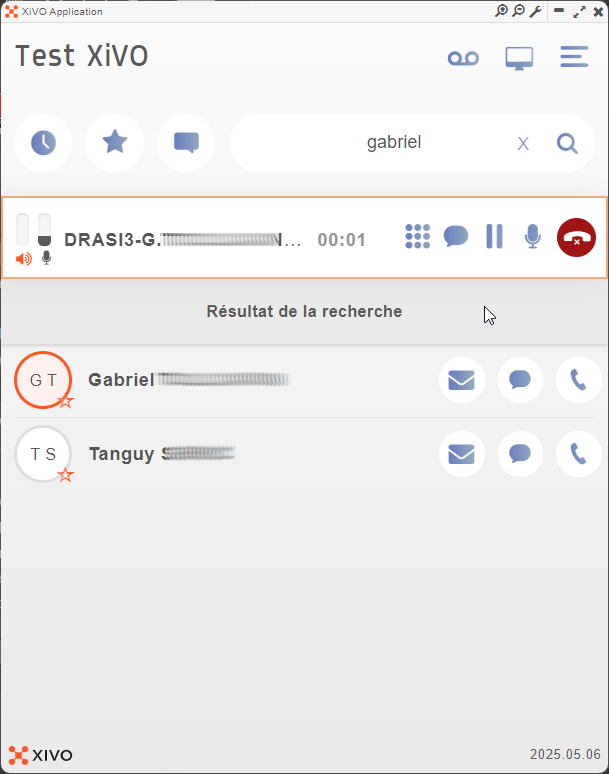
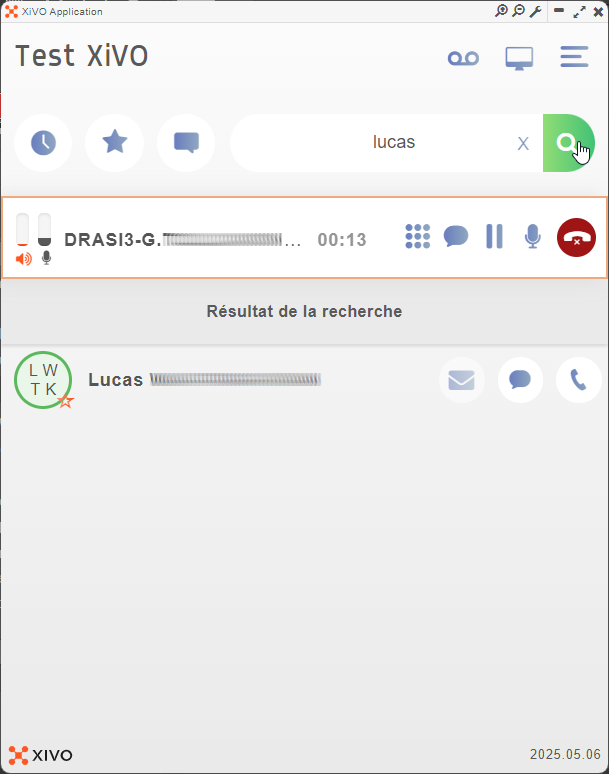
</td></tr><tr style="height: 492.812px;"><td style="vertical-align: middle; height: 492.812px; border-color: rgb(255, 255, 255); border-style: none; text-align: justify;">- **Vous cherchez la personne vers qui vous voulez transférer l'appel et vous l'appelez.**

</td><td style="vertical-align: middle; height: 492.812px; border-color: rgb(255, 255, 255); border-style: none;">[![xivo3.png](https://portail.ac-reunion.fr/ladoclela/uploads/images/gallery/2026-04/scaled-1680-/xivo3.png)](https://portail.ac-reunion.fr/ladoclela/uploads/images/gallery/2026-04/xivo3.png)

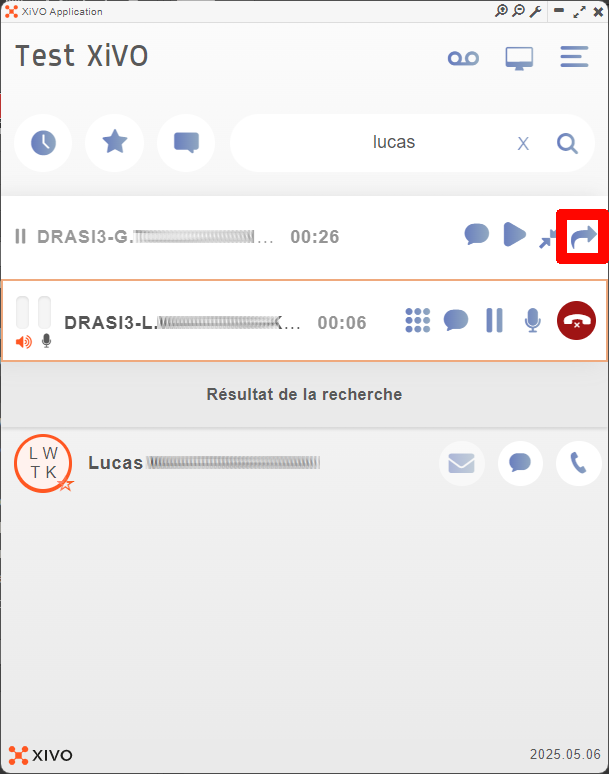
</td></tr><tr style="height: 492.812px;"><td style="vertical-align: middle; height: 492.812px; border-color: rgb(255, 255, 255); border-style: none; text-align: justify;">- **Une fois qu'il a répondu, cliquez sur le bouton "<sub>![icon_xivo_transférer.png](https://portail.ac-reunion.fr/ladoclela/uploads/images/gallery/2026-04/scaled-1680-/icon-xivo-transferer.png)</sub> Transférer".**

</td><td style="vertical-align: middle; height: 492.812px; border-color: rgb(255, 255, 255); border-style: none;">[![xivo5.png](https://portail.ac-reunion.fr/ladoclela/uploads/images/gallery/2026-04/scaled-1680-/xivo5.png)](https://portail.ac-reunion.fr/ladoclela/uploads/images/gallery/2026-04/xivo5.png)

</td></tr><tr style="height: 29.7969px;"><td style="vertical-align: middle; height: 29.7969px; border-color: rgb(255, 255, 255); border-style: none; text-align: justify;">- **L'appel est transféré et les deux appels disparaissent de votre écran.**

</td><td style="vertical-align: middle; height: 29.7969px; border-color: rgb(255, 255, 255); border-style: none;">[![xivo6.png](https://portail.ac-reunion.fr/ladoclela/uploads/images/gallery/2026-04/scaled-1680-/xivo6.png)](https://portail.ac-reunion.fr/ladoclela/uploads/images/gallery/2026-04/xivo6.png)

</td></tr></tbody></table>

</details>
---

#### **Faire une conférence**

<details id="bkmrk-faire-une-conf%C3%A9rence-1"><summary>Faire une conférence</summary>

<table border="1" style="border-collapse: collapse; width: 100%;"><colgroup><col style="width: 50%;"></col><col style="width: 50%;"></col></colgroup><tbody><tr><td style="vertical-align: middle; border-color: rgb(255, 255, 255); border-style: none;">- **Appelez une première personne.**

</td><td style="vertical-align: middle; border-color: rgb(255, 255, 255); border-style: none;">[![xivo7.png](https://portail.ac-reunion.fr/ladoclela/uploads/images/gallery/2026-04/scaled-1680-/xivo7.png)](https://portail.ac-reunion.fr/ladoclela/uploads/images/gallery/2026-04/xivo7.png)</td></tr><tr><td style="vertical-align: middle; border-color: rgb(255, 255, 255); border-style: none;">- **Appelez une seconde personne**

</td><td style="vertical-align: middle; border-color: rgb(255, 255, 255); border-style: none;">[![xivo8.png](https://portail.ac-reunion.fr/ladoclela/uploads/images/gallery/2026-04/scaled-1680-/xivo8.png)](https://portail.ac-reunion.fr/ladoclela/uploads/images/gallery/2026-04/xivo8.png)  
</td></tr><tr><td style="vertical-align: middle; border-color: rgb(255, 255, 255); border-style: none;">- **Cliquez sur le bouton "<sub>![icon_xivo_conference.png](https://portail.ac-reunion.fr/ladoclela/uploads/images/gallery/2026-04/scaled-1680-/icon-xivo-conference.png)</sub> Conférence".**

</td><td style="vertical-align: middle; border-color: rgb(255, 255, 255); border-style: none;">[![xivo9.png](https://portail.ac-reunion.fr/ladoclela/uploads/images/gallery/2026-04/scaled-1680-/xivo9.png)](https://portail.ac-reunion.fr/ladoclela/uploads/images/gallery/2026-04/xivo9.png)

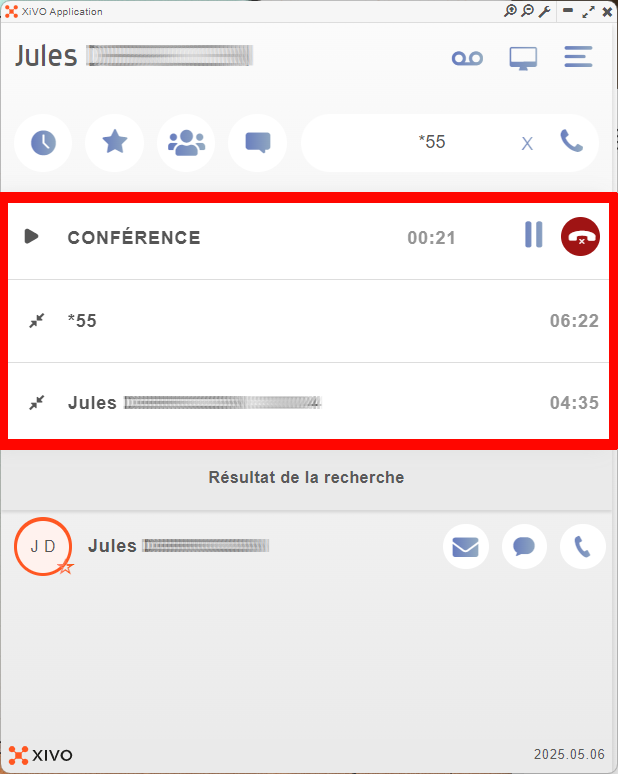
</td></tr><tr><td style="vertical-align: middle; border-color: rgb(255, 255, 255); border-style: none;">- **La conférence est en cours.**

</td><td style="vertical-align: middle; border-color: rgb(255, 255, 255); border-style: none;">[![xivo10.png](https://portail.ac-reunion.fr/ladoclela/uploads/images/gallery/2026-04/scaled-1680-/xivo10.png)](https://portail.ac-reunion.fr/ladoclela/uploads/images/gallery/2026-04/xivo10.png)

</td></tr></tbody></table>

</details>
#### **Tutoriel vidéo**

<video class=" align-center" controls="controls" height="1006" poster="" width="566"><source src="https://podeduc.apps.education.fr/media/videos/69ad71e4757450b26ac3bf7437fab6923afd6e4f78413b393cb68710924828b1/139083/720p.mp4" type="video/mp4"></source></video>

---

<p class="callout success">**Félicitations, vous savez désormais comment gérer vos appels**</p>