# Gérer ses groupes d'appels

Dans cette section, nous allons aborder les groupes d'appel. Ceux-ci permettent de regrouper tous les usagers d'un même service sous un numéro unique. Vous avez également la possibilité de suspendre temporairement ce numéro si nécessaire.

#### **Accéder aux groupes d'appels**

<details id="bkmrk-%C2%A0-4"><summary>Accéder aux groupes d'appels</summary>

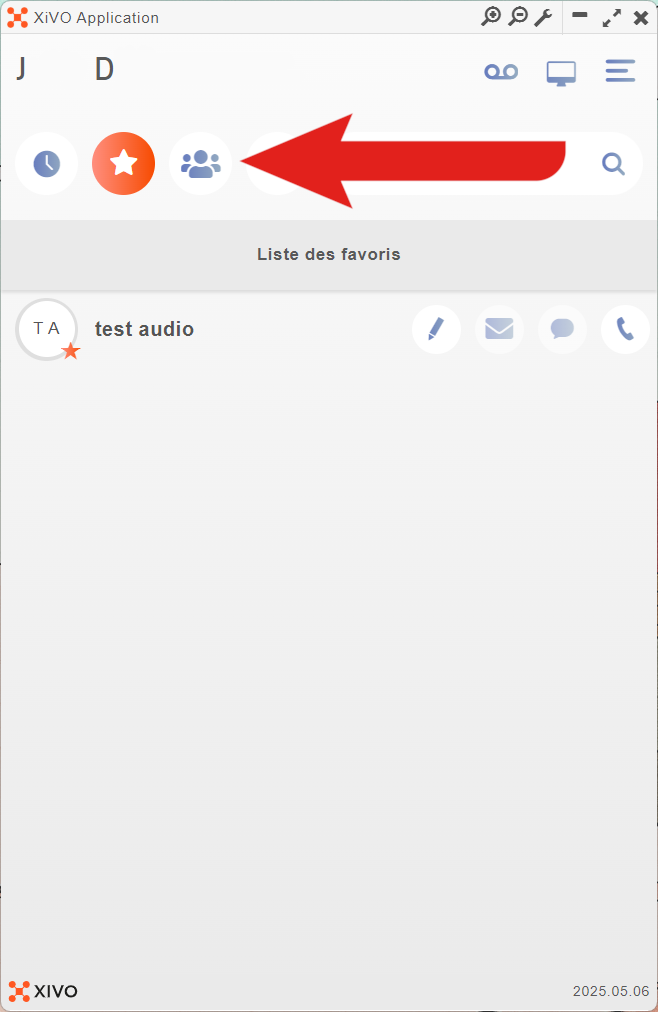
<table border="1" style="border-collapse: collapse; width: 100%; height: 622.078px; border-width: 1px; border-style: none;"><colgroup><col style="width: 50%;"></col><col style="width: 50%;"></col></colgroup><tbody><tr style="height: 592.281px;"><td style="height: 592.281px; vertical-align: middle; border-style: none;">- **En haut de l'application, cliquez sur "![xivo_logo_icon_groupe_appel.png](https://portail.ac-reunion.fr/ladoclela/uploads/images/gallery/2026-08/scaled-1680-/xivo-logo-icon-groupe-appel.png) Groupe d'appel".**

</td><td style="height: 592.281px; vertical-align: middle; border-style: none;">[![xivo1007.png](https://portail.ac-reunion.fr/ladoclela/uploads/images/gallery/2026-08/scaled-1680-/xivo1007.png)](https://portail.ac-reunion.fr/ladoclela/uploads/images/gallery/2026-08/xivo1007.png)

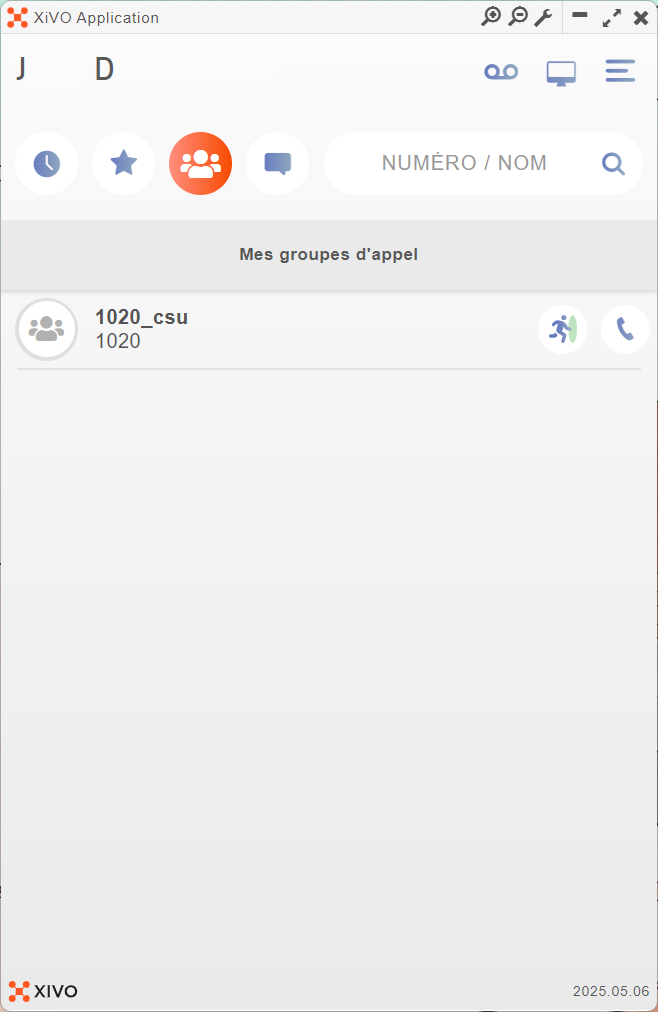
</td></tr><tr style="height: 29.7969px;"><td style="height: 29.7969px; vertical-align: middle; border-style: none;">- **Vous retrouvez tous les groupes d'appel auxquels vous êtes affecté.**

</td><td style="height: 29.7969px; vertical-align: middle; border-style: none;">[![xivo101.png](https://portail.ac-reunion.fr/ladoclela/uploads/images/gallery/2026-08/scaled-1680-/xivo101.png)](https://portail.ac-reunion.fr/ladoclela/uploads/images/gallery/2026-08/xivo101.png)

</td></tr></tbody></table>

</details>---

#### **Prendre les appels du groupe ou les mettre en pause**

<details id="bkmrk-%C2%A0-5"><summary>Prendre les appels du groupe ou les mettre en pause</summary>

- **À droite du groupe d'appel, cliquez sur le logo en forme de personnage.**

[![xivo102.png](https://portail.ac-reunion.fr/ladoclela/uploads/images/gallery/2026-08/scaled-1680-/xivo102.png)](https://portail.ac-reunion.fr/ladoclela/uploads/images/gallery/2026-08/xivo102.png)

<table border="1" style="border-collapse: collapse; width: 100%; height: 128.781px;"><colgroup><col style="width: 50%;"></col><col style="width: 50%;"></col></colgroup><tbody><tr style="height: 29.7969px;"><td class="align-center" style="background-color: rgb(53, 152, 219); height: 29.7969px; border-color: rgb(0, 0, 0); border-style: solid;"><span style="color: rgb(236, 240, 241);">**LE GROUPE D'APPEL EST EN PAUSE**</span></td><td class="align-center" style="background-color: rgb(53, 152, 219); height: 29.7969px; border-color: rgb(0, 0, 0); border-style: solid;"><span style="color: rgb(236, 240, 241);">**LE GROUPE D'APPEL EST ACTIF**</span></td></tr><tr style="height: 88.9844px;"><td style="height: 88.9844px; border-color: rgb(0, 0, 0); border-style: solid;">[![image.png](https://portail.ac-reunion.fr/ladoclela/uploads/images/gallery/2026-08/scaled-1680-/J16image.png)](https://portail.ac-reunion.fr/ladoclela/uploads/images/gallery/2026-08/J16image.png)

</td><td style="height: 88.9844px; border-color: rgb(0, 0, 0); border-style: solid;">[![image.png](https://portail.ac-reunion.fr/ladoclela/uploads/images/gallery/2026-08/scaled-1680-/qGyimage.png)](https://portail.ac-reunion.fr/ladoclela/uploads/images/gallery/2026-08/qGyimage.png)

</td></tr><tr style="height: 10px;"><td class="align-center" style="height: 10px; border-color: rgb(0, 0, 0); border-style: solid;">**À gauche, l'avatar est grisé**</td><td class="align-center" style="height: 10px; border-color: rgb(0, 0, 0); border-style: solid;">**À gauche, l'avatar est vert**</td></tr></tbody></table>

</details><p class="callout success">**Félicitations, vous savez désormais comment gérer vos groupes d'appel**</p>