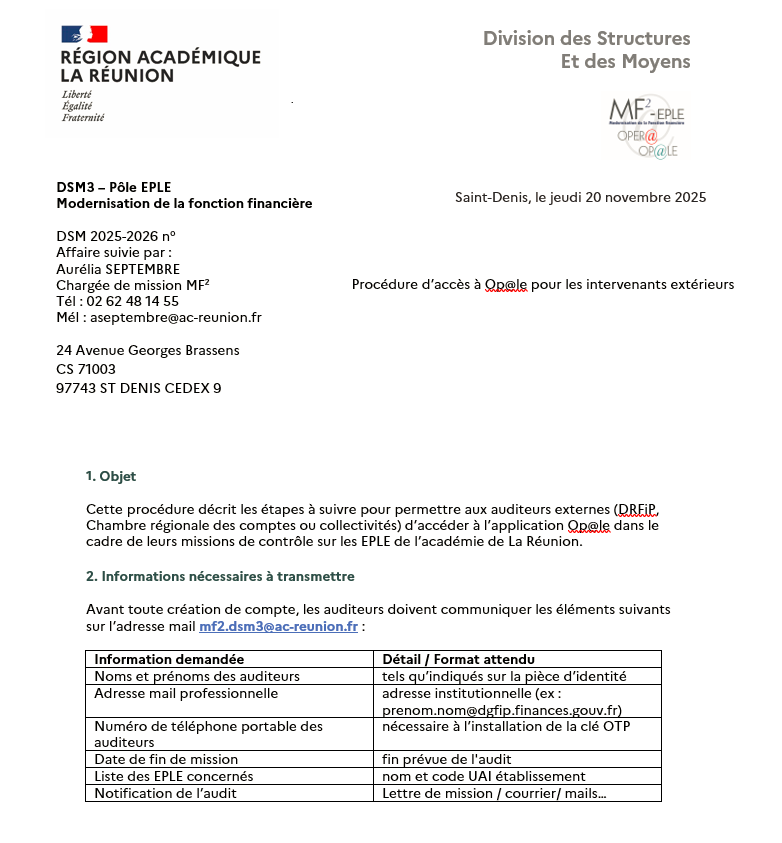
# Procédure d’accès à Op@le pour les intervenants extérieurs

[![image.png](https://portail.ac-reunion.fr/ladoclela/uploads/images/gallery/2025-11/scaled-1680-/JmBimage.png)](https://portail.ac-reunion.fr/ladoclela/uploads/images/gallery/2025-11/JmBimage.png)
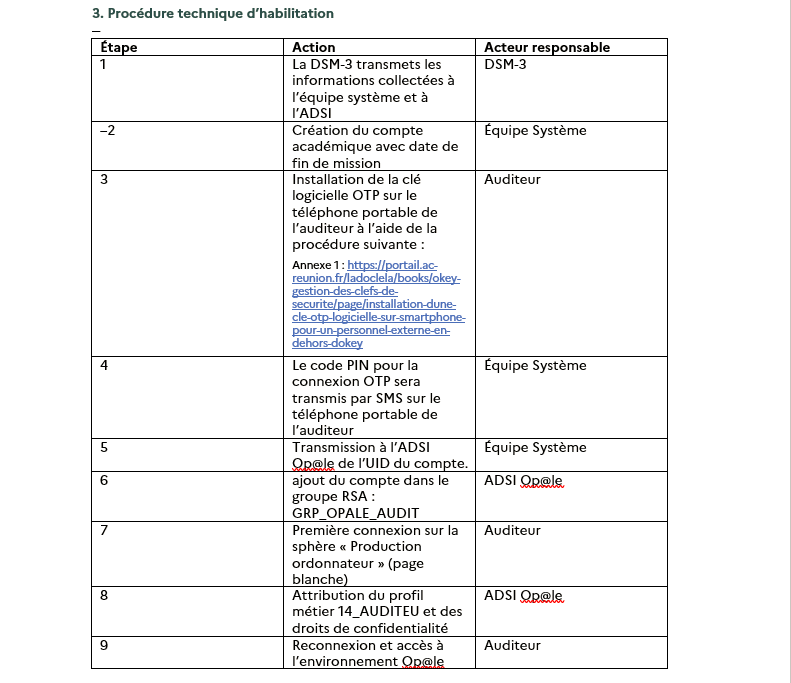
[![image.png](https://portail.ac-reunion.fr/ladoclela/uploads/images/gallery/2025-11/scaled-1680-/n92image.png)](https://portail.ac-reunion.fr/ladoclela/uploads/images/gallery/2025-11/n92image.png)
#### <span style="color: rgb(0, 0, 0);">**<span style="font-size: 10.0pt; font-family: Marianne;">Connexion depuis l’extérieur d’un établissement</span>**</span>

<span style="font-size: 10.0pt; font-family: Marianne;">Pour se connecter à Op@le depuis un poste extérieur (ex. domicile, service DRFiP, collectivité), suivez les étapes suivantes :</span>

<span style="font-size: 10.0pt; font-family: Marianne;">1. Fermez entièrement votre navigateur web s’il était déjà ouvert.  
2\. Rouvrez le navigateur.  
3\. Ouvrez la page : </span>[<span style="font-size: 10.0pt; font-family: Marianne;">https://portail.ac-reunion.fr/</span>](https://portail.ac-reunion.fr/)

<span style="font-size: 10.0pt; font-family: Marianne;">4. Connectez-vous avec votre clé OTP (code PIN + chiffres affichés sur la clé).  
5\. Dans la rubrique « Administration financière et comptable », cliquez sur le lien « Op@le ».  
6\. Vous pouvez aussi taper « OP » dans « Rechercher une application ».</span>

#### **<span style="color: rgb(0, 0, 0);"><span style="font-size: 10.0pt; font-family: Marianne;">Connexion depuis un établissement</span></span>**

<span style="font-size: 10.0pt; font-family: Marianne;">Pour vous connecter en filaire depuis un établissement</span><span style="font-size: 10.0pt; font-family: 'Calibri',sans-serif;"> </span><span style="font-size: 10.0pt; font-family: Marianne;">:</span>

<span style="font-size: 10.0pt; font-family: Marianne;">1. Ouvrez la page : </span>[<span style="font-size: 10.0pt; font-family: Marianne; color: windowtext; text-decoration: none; text-underline: none;">https://scoweb.ac-reunion.fr</span>](https://scoweb.ac-reunion.fr/)<span style="font-size: 10.0pt; font-family: Marianne;"> </span>

<span style="font-size: 10.0pt; font-family: Marianne;">2. Dans la rubrique « Administration financière et comptable », cliquez sur le lien « Op@le ».</span>

[![image.png](https://portail.ac-reunion.fr/ladoclela/uploads/images/gallery/2025-11/scaled-1680-/Bhfimage.png)](https://portail.ac-reunion.fr/ladoclela/uploads/images/gallery/2025-11/Bhfimage.png)

## <span style="color: rgb(0, 0, 0);">**<span style="font-size: 10.0pt; font-family: Marianne;">5. Fin de mission </span>**</span>

**<span style="font-size: 10.0pt; font-family: Marianne; mso-bidi-font-family: Arial;">Afin de garantir la confidentialité des données, je vous remercie de bien vouloir nous adresser, à l’issue de votre mission, un mail confirmant formellement la fin de votre intervention.</span>**<span style="font-size: 10.0pt; font-family: Marianne;">  
Cette notification de clôture est obligatoire, le mail devra être adressé à :</span>

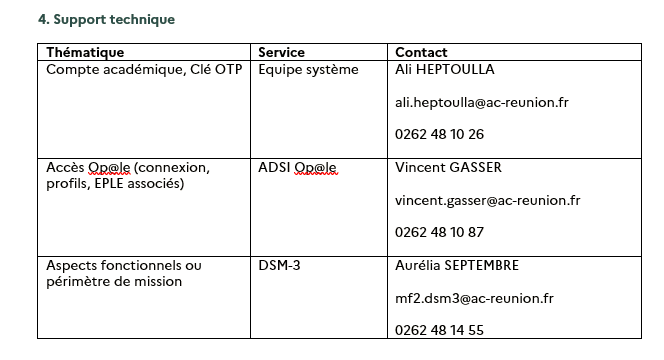
[<span style="font-size: 10.0pt; font-family: Marianne;">mf2.dsm3@ac-reunion.fr</span>](mailto:mf2.dsm3@ac-reunion.fr)

[<span style="font-size: 10.0pt; font-family: Marianne;">vincent.gasser@ac-reunion.fr</span>](mailto:vincent.gasser@ac-reunion.fr)

[<span style="font-size: 10.0pt; font-family: Marianne;">ali.heptoulla@ac-reunion.fr</span>](mailto:ali.heptoulla@ac-reunion.fr)

<span style="mso-fareast-language: FR;"> </span>