# Guides d'utilisation
# Principe
[](https://portail.ac-reunion.fr/ladoclela/uploads/images/gallery/2021-09/image-1630916287273.png)[](https://portail.ac-reunion.fr/ladoclela/uploads/images/gallery/2021-09/image-1630916279300.png)
| **Principe** | [Paramètres optionnels et statistiques](https://portail.ac-reunion.fr/ladoclela/books/raccourcisseur-durl-academique/page/parametres-optionnels "Paramètres optionnels") | [Raccourcis automatiques](https://portail.ac-reunion.fr/ladoclela/books/raccourcisseur-durl-academique/page/raccourcis-automatiques "Raccourcis automatiques") |
Ce service, proposé par Académie de La Réunion à l'ensemble de ses usagers, vous permet de **créer le raccourci d'une adresse web**, c'est à dire qu'il vous permet d'associer une adresse web dite longue à un format court :
exemple **d'URL1 longue**
> https://www.google.fr/maps/@-20.9033095,55.4828608,3a,75y,200.25h,106.07t/data=!3m6!1e1!3m4!1s667G5Qx7QtOk4fwQunyZMw!2e0!7i13312!8i6656
exemple **au format court**
> https://aca.re/xYzAb1 : la portion xYzAb1 est ce que l'on appelle le "**code court**"
Le **code court** est *aléatoire*, mais vous pouvez [](https://portail.ac-reunion.fr/ladoclela/uploads/images/gallery/2021-09/image-1630916427638.png)celui proposé initialement par un nouveau code aléatoire (tant que votre raccourci n'est pas enregistré).
### Pourquoi utiliser une URL courte ?
##### **Pour rendre le lien plus simple à gérer**
Les URL complètes sont parfois très longues et ne paraissent pas ordonnées. Les URL longues ne sont pas faciles à mémoriser et les partager dans un courriel peut nuire à la lisibilité du message - et parfois le client mail force un retour à la ligne au milieu de l'URL longue et le lien s'en trouve coupé. Une URL courte est plus facile à mémoriser et à diffuser, en particulier lorsque les liens sont personnalisés.
Enfin, la concision d'une URL courte peut dans certain cas avoir un impact réel dans des situations où le nombre de caractères utilisés est critique (twit, sms).
##### **Suivre l'utilisation de votre lien**
Cet outil vous permet de suivre le nombre de clics par lien. Ainsi, vous pouvez comparer l'exploitation de chaque lien, mesurer l'impact d'une campagne de communication et prendre des mesures adaptées à l'usage constaté.
##### **Et pourquoi aca.re ?**
On trouve de nombreux services sur internet pour raccourcir des adresses longues.
Neanmoins cet outil vous permet de conserver les informations au sein de l'infrastructure académique, évitant ainsi le recours à des services de tiers, privés, sans contrôle.
Le format court aca.re permet de maintenir l'identité "Académie de La Réunion" sur les liens proposés.
Enfin, le domaine aca.re étant géré pleinement par notre DSI, il permet d'enrichir "sur mesures" son usage (cf raccourcis automatiques) tout en gardant un format d'adresse homogène.
Et puisqu'il s'agit de véhiculer l'identité de Académie de La Réunion, le fonctionnement proposé par défaut est de construire un lien court à l'aide d'un code aléatoire. Les fonctionnalités avancées de créations personnalisées sont réservées aux personnels autorisés ; Vous pouvez retrouver tout le détail des options auxquelles *vous* avez accès, dans l'onglet "Paramètres optionnels" **à partir de la documentation en ligne consultable directement depuis l'outil**.
1 : Une Adresse Web est couramment désignée par le sigle URL : *Uniform Ressource Locator*, référentiel de nommage uniforme d'une ressource identifiée par son emplacement
# Paramètres optionnels et statistiques
[](https://portail.ac-reunion.fr/ladoclela/uploads/images/gallery/2021-09/image-1630916287273.png)[](https://portail.ac-reunion.fr/ladoclela/uploads/images/gallery/2021-09/image-1630916279300.png)
| [Principe](https://portail.ac-reunion.fr/ladoclela/books/raccourcisseur-durl-academique/page/principe "Principe") | **Paramètres optionnels et statistiques** | [Raccourcis automatiques](https://portail.ac-reunion.fr/ladoclela/books/raccourcisseur-durl-academique/page/raccourcis-automatiques "Raccourcis automatiques") |
##### [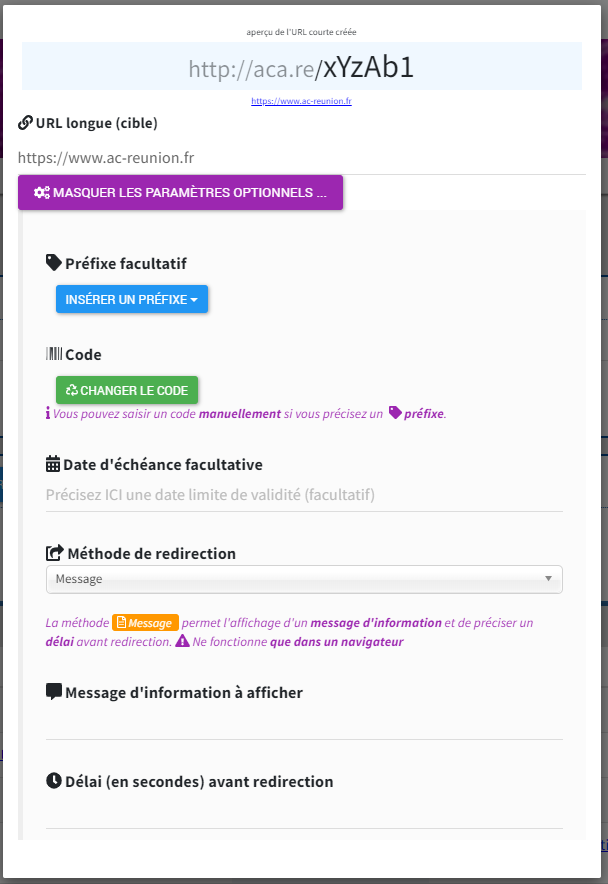](https://portail.ac-reunion.fr/ladoclela/uploads/images/gallery/2021-09/image-1630930895852.png)
fig1 - formulaire de création d'un raccourci, avec les paramètres optionnels affichés
Lors de la création d'un nouveau raccourci, des ** ⚙ paramètres optionnels ** sont proposés :
#### Utilisation d'un préfixe
> **exemple avec préfixe** :
> https://aca.re/prefixe/xYzAb1
La forme avec préfixe est optionnelle et permet de "regrouper" vos adresses courtes en les préfixant par :
- - - Votre **identifiant académique**. Si votre *identifiant académique* (ex ** pnom **) se distingue de la *partie identification de votre adresse de messagerie* (ex ** prenom.nom **), cette dernière est également proposée ;
- *Personnels affectés au rectorat* : Le **code de votre division** et le **code de votre service** ;
- *Personnels de Direction et référents informatiques en établissement* : Le **code RNE de votre établissement** ;
Vous avez la possibilité d'obtenir l'attribution d'un ou plusieurs mots clés réservés afin de les utiliser comme **préfixe** : ils apparaitront alors regroupés sous la section **Projets** dans le menu déroulant d'ajout d'un préfixe prédéfini.
*Les mots-clés réservés peuvent être attribués sur demande motivée, formulée exclusivement sur la plate-forme **fil@os** : en positionnant le dossier sur le produit **aca.re***
#### Définir une date de fin de validité
Facultative, cette option permet de planifier la validité d'une adresse courte dans le cadre d'une opération ponctuelle. Une fois la date limite atteinte, toute tentative d'accès par l'adresse courte informera le demandeur de sa fin de validité.
#### Deux méthodes de redirection
- ** Directe ** : méthode par défaut, la redirection est automatique ;
- **Message** : méthode consistant en l'affichage d'une page intersticielle dans le navigateur, vous laissant la possibilité de rédiger un court message d'information. Vous pouvez également choisir la durée du temps d'attente avant la redirection effective vers l'adresse cible.
#### Statistiques des visites
La date et l'heure de chaque visite sur votre adresse courte est enregistrée. Ces données permettent de vous proposer des graphiques donnant une vue d'ensemble des visites.
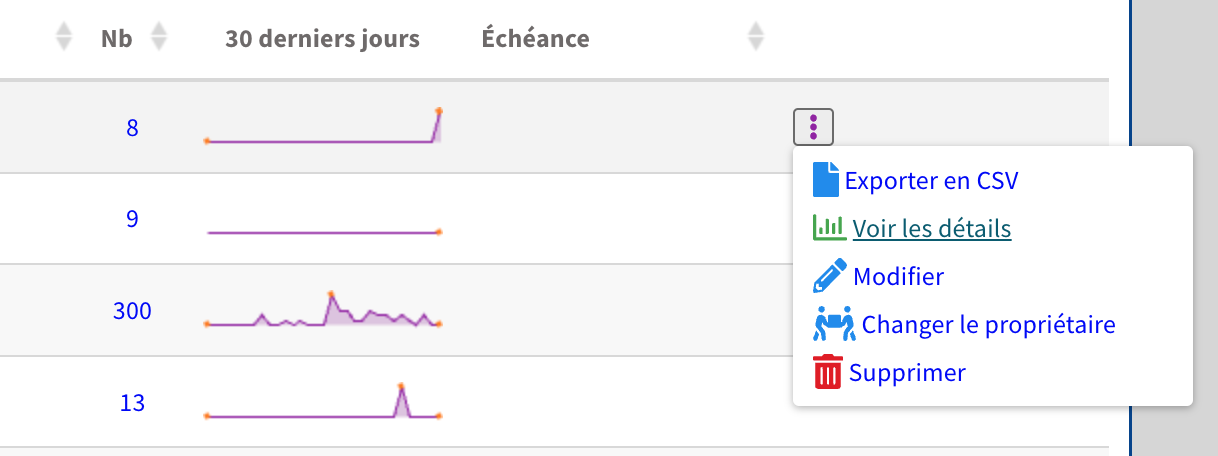
Sur la page d'accueil de l'outil, dans la liste de vos raccourcis créés, sur chaque ligne **un graphique représente l'aperçu de l'activité des 30 derniers jours** pour le raccourci concerné.
[](https://portail.ac-reunion.fr/ladoclela/uploads/images/gallery/2023-08/f6oimage.png)
#####
fig2 - focus sur le bouton d'action, à droite de l'aperçu de l'activité des 30 derniers jours, pour accéder aux statistiques
Pour les consulter il suffit de cliquer sur le **compteur de visites**, ou d'utiliser le **bouton d'action** et sélectionner dans le menu déroulant l'option **"Voir les détails ".**
##### [](https://portail.ac-reunion.fr/ladoclela/uploads/images/gallery/2021-09/image-1630931700884.png)
fig3 - consultation des statistiques : distribution des horaires de visites (violet) et cumul par jour (bleu)
Le graphique présente une vue d'ensemble avec le nombre de visites par jour, et pour chaque jour une distribution des horaires de visites.
La **légende est cliquable** et permet de masquer les courbes
##### [](https://portail.ac-reunion.fr/ladoclela/uploads/images/gallery/2021-09/image-1630931806932.png)fig4 - légende horaire de visite barrée, on n'affiche que le **cumul du nombre de visites par jour** (axe des ordonnées de **gauche**)
##### [](https://portail.ac-reunion.fr/ladoclela/uploads/images/gallery/2021-09/image-1630931892732.png)
fig5 - légende nombre de visite barrée, on n'affiche que les **horaires de visites** (axe des ordonnées de **droite**)
Une évolution future permettra de **choisir la période d'affichage** des statistiques, **actuellement c'est l'intégralité des visites** qui sont affichées.
### Export en CSV
L'export en csv sur un raccourci permet d'avoir le nombre de clics par jour
Exemple :
| **Jour**
| **Nombre de clics**
|
| **2023-07-19**
| 6
|
| **2023-07-25**
| 1
|
| **2023-08-30**
| 1
|
### Changement de propriétaire
Si vous disposez des habilitations nécessaires, vous verrez l'option 'changer le propriétaire' dans le menu contextuel.
Cette option permet pour un raccourci donné d'en changer de propriétaire.
Dans le cas ou vous souhaiteriez effectuer un changement de propriétaire et que ce menu n'était pas visible, veuillez formuler votre demande via ticker [Fil@os](mailto:Fil@os) en précisant :
- non court du raccourci
- lien cible du raccourci
- mail de la personne a qui vous souhaitez transférer le raccourci
# Raccourcis automatiques
[](https://portail.ac-reunion.fr/ladoclela/uploads/images/gallery/2021-09/image-1630916287273.png)[](https://portail.ac-reunion.fr/ladoclela/uploads/images/gallery/2021-09/image-1630916279300.png)
| [Principe](https://portail.ac-reunion.fr/ladoclela/books/raccourcisseur-durl-academique/page/principe "Principe") | [Paramètres optionnels et statistiques](https://portail.ac-reunion.fr/ladoclela/books/raccourcisseur-durl-academique/page/parametres-optionnels "Paramètres optionnels") | **Raccourcis automatiques** |
**Le *nom de domaine* "aca.re" est également utilisé pour proposer des raccourcis dits automatiques**
Ils ne sont pas modifiables ou déclarables dans cet outil et pour éviter toute confusion (ou comportement aléatoire) les mots clés utilisés ne sont pas disponibles comme préfixe ou comme code court. Voici quelques **raccourcis automatiques utilisés** dans l'académie de la Réunion, avec une explication sur leur syntaxe, pour vous donner des pistes d'usage :
#### **Fil@os -** L'accès au portail d'assistance (usagers DANE, DSI, DL)
` http://aca.re/filaos ` ;
URL Longue correspondante : `https://filaos.ac-reunion.fr/pages/exec.php?exec_module=itop-portal`
#### **Calendar -** le calendrier académique
`http://aca.re/cal/identifiant/calendar
`URL Longue correspondante :
`https://portail.ac-reunion.fr/caldav/dav/home/identifiant/calendar`
accès au calendrier par défaut du compte **identifiant**
`http://aca.re/cal/identifiant/id_calendrier
`URL Longue correspondante :
`https://portail.ac-reunion.fr/caldav/dav/home/identifiant/id_calendrier`
accès à un calendrier spécifique identifié par **id\_calendrier** du compte **identifiant**.
Veuillez noter qu'une authentification est requise (identifiants messagerie).
#### **DokuWiki -** l'ancien "wiki" académique, espace de documentation
Accès direct à une page :
` http://aca.re/wiki/chemin:section:page
`` http://aca.re/dw/chemin:section:page
`URL Longue correspondante :
`https://magmatic.ac-reunion.fr/dokuwiki/doku.php.id=chemin:section:page`
Accès direct à un fichier média :
` http://aca.re/wikifile/chemin:section:media.ext
`` http://aca.re/dw/chemin:section:media.ext
`` http://aca.re/wiki-pj/chemin:section:media.ext
`` http://aca.re/wiki-fichier/chemin:section:media.ext
`URL Longue correspondante :`
https://magmatic.ac-reunion.fr/dokuwiki/lib/exe/fetch.php?media=chemin:section:media.ext`
` http://aca.re/wiki ` et ` http://aca.re/dw ` vous donnent un accès direct au wiki académique.
**Plug-in Reduc.URL / aca.re pour Dokuwiki **
Utilisez la barre d'outil dans le coin supérieur droit sur une page **Dokuwiki** pour afficher le raccourci au format **aca.re** de la page courante, si besoin, utilisez le bouton droit de la souris pour afficher le menu contextuel permettant de copier l'adresse :
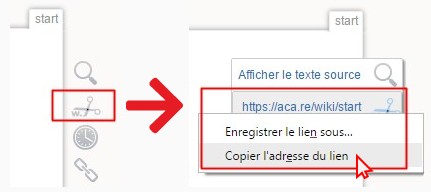
*fig1 - captures extraites de l'application dokuwiki*
*un raccourci automatique **LaDocLéLa** est à l'étude*
# Raccourcis automatiques DSI DANE
[](https://portail.ac-reunion.fr/ladoclela/uploads/images/gallery/2021-09/image-1630916287273.png)[](https://portail.ac-reunion.fr/ladoclela/uploads/images/gallery/2021-09/image-1630916279300.png)
| [Principe](https://portail.ac-reunion.fr/ladoclela/books/raccourcisseur-durl-academique/page/principe "Principe") | [Paramètres optionnels et statistiques](https://portail.ac-reunion.fr/ladoclela/books/raccourcisseur-durl-academique/page/parametres-optionnels "Paramètres optionnels") | [Raccourcis automatiques](https://portail.ac-reunion.fr/ladoclela/books/raccourcisseur-durl-academique/page/raccourcis-automatiques "Raccourcis automatiques") | **Raccourcis automatiques
DSI DANE** |
Voici quelques **raccourcis automatiques utilisés** par la DSI et la DANE dans l'académie de la Réunion :
#### **Fil@s -** le portail utilisateur
` http://aca.re/filaos ` ;
URL Longue correspondante : `https://filaos.ac-reunion.fr/pages/exec.php?exec_module=itop-portal`
#### **Fil@s -** le portail intervenant (console iTop)
` http://aca.re/itop ` ;
URL Longue correspondante : `https://filaos.ac-reunion.fr/pages/UI.php`
Accès direct à un dossier iTop depuis le portail intervenant (console iTop) :`
http://aca.re/itop/ R-012345 ` ;
URL Longue correspondante :
`https://filaos.ac-reunion.fr/pages/UI.php?operation=details&class=UserRequest&id=R-012345`
` http://aca.re/itop/ I-056789 ` ;
URL Longue correspondante :
`https://filaos.ac-reunion.fr/pages/UI.php?operation=details&class=Incident&id=I-056789`
#### **nextCloud -** le cloud interne1
` http://aca.re/cloud ` ;
` http://aca.re/nc ` ;
URL Longue correspondante :
`https://sso.ac-reunion.fr/saml?sp_ident=magmatic&RelayState=https://magmatic.ac-reunion.fr/nextcloud`
#### **Etherpad -** le bloc-notes collaboratif académique1
` http://aca.re/pad ` ;
URL Longue correspondante :
`https://sso.ac-reunion.fr/saml?sp_ident=magmatic&RelayState=https://magmatic.ac-reunion.fr/etherhome/#/etherpad/`
Accès direct à un pad :`
http://aca.re/pad/ code_du_pad ` ;
URL Longue correspondante :
`https://sso.ac-reunion.fr/saml?sp_ident=magmatic&RelayState=https://magmatic.ac-reunion.fr/etherpad/p/code_du_pad`
#### **LimeSurvey -** la plate-forme de questionnaires académiques1
Accès à l'**application** :
` http://aca.re/ls ` ;
` http://aca.re/survey ` ;
URL Longue correspondante :
`https://sso.ac-reunion.fr/saml?sp_ident=magmatic&RelayState=https://magmatic.ac-reunion.fr/limesurvey/`
Accès **en mode création** :
` http://aca.re/lsa ` ;
` http://aca.re/survey-admin ` ;
URL Longue correspondante :
`https://sso.ac-reunion.fr/saml?sp_ident=magmatic&RelayState=https://magmatic.ac-reunion.fr/limesurvey/index.php/admin`
Authentification des formulaire limesurvey
https://seshat.ac-reunion.fr/dispatcher/lime/
#### **Moodle -** la plate-forme académique de conception de cours en ligne1
` http://aca.re/moodle ` ;
` http://aca.re/mooc ` ;
URL Longue correspondante :
`https://sso.ac-reunion.fr/saml?sp_ident=magmatic&RelayState=https://magmatic.ac-reunion.fr/moodle/`
#### le générateur de **QR-Codes**
` http://aca.re/qrcode/chaine_de_caracteres ` :
Cela crée et affiche une représentation de **chaine\_de\_caracteres** sous la forme d'un QR-Code.
**EXPERIMENTAL** *Le générateur de QR codes ne permet d'encoder que de simples chaines de caractères, en particulier **une URL ne fonctionnera pas.***
**notes :
1 -** Les raccourcis des services Magmatic **forcent l'authentification académique** avant d'accéder *par fédération d'identité* au serveur Magmatic - l'authentification se fait donc via l'identité académique
# Transfert de propriété
Vous quittez vos missions et souhaitez que vos raccourcis puissent être toujours utilisés ?
Dans ce cas vous avez la possibilité d'en transférer la propriété à un autre personne
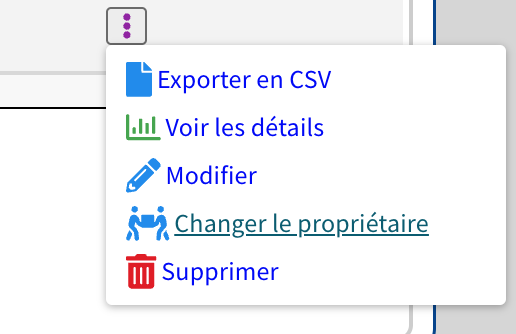
Cliquez sur les trois points verticaux, afin d'ouvrir le menu
Cliquez sur **Changer le propriétaire**
[](https://portail.ac-reunion.fr/ladoclela/uploads/images/gallery/2025-02/YGJimage.png)
Dans la fenêtre qui s'affiche il vous suffit de faire une recherche de la personne a qui vous souhaitez transférer la propriété