# Présentation utilisateur Adobe Acrobat Reader 24

<span style="font-family: 'Calibri Light',sans-serif; mso-ascii-theme-font: major-latin; mso-hansi-theme-font: major-latin; mso-bidi-theme-font: major-latin;"> </span>

### <span style="font-size: 18pt; line-height: 107%; color: rgb(35, 111, 161);">Pourquoi avoir apporté des modifications ?</span>

- **<span style="font-size: 12.0pt; font-family: 'Calibri Light',sans-serif; mso-ascii-theme-font: major-latin; mso-fareast-font-family: 'Times New Roman'; mso-hansi-theme-font: major-latin; mso-bidi-theme-font: major-latin; mso-fareast-language: FR;">Visibilité et fluidité</span>**<span style="font-size: 12.0pt; font-family: 'Calibri Light',sans-serif; mso-ascii-theme-font: major-latin; mso-fareast-font-family: 'Times New Roman'; mso-hansi-theme-font: major-latin; mso-bidi-theme-font: major-latin; mso-fareast-language: FR;"> : Aider les utilisateurs à découvrir les fonctionnalités qu’ils ne pouvaient pas trouver et leur présenter celles dont ils ignoraient l’existence. Plus important encore, éliminer les frictions entre les tâches afin que les utilisateurs puissent facilement passer d’une tâche à l’autre (par exemple, une personne qui consulte des commentaires dans un PDF doit également pouvoir facilement modifier le texte.</span>
- **<span style="font-size: 12.0pt; font-family: 'Calibri Light',sans-serif; mso-ascii-theme-font: major-latin; mso-fareast-font-family: 'Times New Roman'; mso-hansi-theme-font: major-latin; mso-bidi-theme-font: major-latin; mso-fareast-language: FR;">Complexité</span>**<span style="font-size: 12.0pt; font-family: 'Calibri Light',sans-serif; mso-ascii-theme-font: major-latin; mso-fareast-font-family: 'Times New Roman'; mso-hansi-theme-font: major-latin; mso-bidi-theme-font: major-latin; mso-fareast-language: FR;"> : les nombreux outils et workflows d’Acrobat étaient dispersés sur différentes surfaces, ce qui rendait difficile leur recherche pour les utilisateurs. De plus, l’interface utilisateur semblait encombrée par plusieurs options dans la barre de navigation supérieure. La recherche de valeur sous plusieurs outils exigeait que les utilisateurs passent d’une catégorie d’outils à une autre.</span>
- **<span style="font-size: 12.0pt; font-family: 'Calibri Light',sans-serif; mso-ascii-theme-font: major-latin; mso-fareast-font-family: 'Times New Roman'; mso-hansi-theme-font: major-latin; mso-bidi-theme-font: major-latin; mso-fareast-language: FR;">Expérience déconnectée</span>**<span style="font-size: 12.0pt; font-family: 'Calibri Light',sans-serif; mso-ascii-theme-font: major-latin; mso-fareast-font-family: 'Times New Roman'; mso-hansi-theme-font: major-latin; mso-bidi-theme-font: major-latin; mso-fareast-language: FR;"> : les utilisateurs devaient retrouver leurs automatismes à chaque fois qu’ils changeaient d’appareil, ce qui donnait l’impression d’une expérience décousue d’une plateforme à l’autre. Créer une expérience cohérente qui garantit la continuité entre les plateformes.</span>

<span style="font-family: 'Calibri Light',sans-serif; mso-ascii-theme-font: major-latin; mso-hansi-theme-font: major-latin; mso-bidi-theme-font: major-latin;"> </span>

### <span style="font-size: 18pt; line-height: 107%; color: rgb(35, 111, 161);">Quels sont les changements apportés ?</span>

<span style="font-family: 'Calibri Light',sans-serif; mso-ascii-theme-font: major-latin; mso-hansi-theme-font: major-latin; mso-bidi-theme-font: major-latin;">Pour répondre aux préoccupations ci-dessus, il a fallu imaginer une expérience Acrobat flexible. Conceptualiser un cadre pour soutenir cette vision et veiller à ce que votre connaissance globale des outils soit au cœur de l’amélioration de l’interface.</span>

#### **<span style="mso-bidi-font-family: 'Calibri Light'; mso-bidi-theme-font: major-latin; color: windowtext;">Méga verbes</span>**

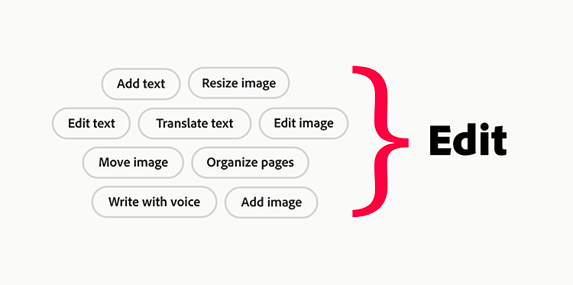
<span style="font-family: 'Calibri Light',sans-serif; mso-ascii-theme-font: major-latin; mso-hansi-theme-font: major-latin; mso-bidi-theme-font: major-latin;">Pour résoudre le problème de visibilité des outils, plus de 250 outils dans Acrobat ont été organisé logiquement en fonction de leurs fonctionnalités et de leur importance. Cela commence par analyser ce que faisaient les utilisateurs d’Acrobat et organisé ces actions en workflows clés (par exemple, « commentaires et modification », « signatures », « organisation et combinaison »), puis énuméré les tâches sous chacun d’eux.</span>

<span style="font-family: 'Calibri Light',sans-serif; mso-ascii-theme-font: major-latin; mso-hansi-theme-font: major-latin; mso-bidi-theme-font: major-latin;"> Les workflows, appelés « méga verbes », ont modifié l’approche de conception en passant d’un modèle axé sur plusieurs tâches individuelles (par exemple, « organisation des pages », « modification de texte » et « ajout d’images ») à un modèle axé sur un workflow complet (par exemple, « modification » ou « affichage »). </span>

[![image.png](https://portail.ac-reunion.fr/ladoclela/uploads/images/gallery/2025-03/scaled-1680-/fKqimage.png)](https://portail.ac-reunion.fr/ladoclela/uploads/images/gallery/2025-03/fKqimage.png)

<span style="font-family: 'Calibri Light',sans-serif; mso-ascii-theme-font: major-latin; mso-hansi-theme-font: major-latin; mso-bidi-theme-font: major-latin; mso-no-proof: yes;"></span>

<span style="font-family: 'Calibri Light',sans-serif; mso-ascii-theme-font: major-latin; mso-hansi-theme-font: major-latin; mso-bidi-theme-font: major-latin;">Le concept de méga verbes est un tournant dans le processus de conception regroupant plusieurs workflows en une seule action.   
  
</span>

#### **<span style="mso-bidi-font-family: 'Calibri Light'; mso-bidi-theme-font: major-latin; color: windowtext;">Regroupement de fonctionnalités</span>**

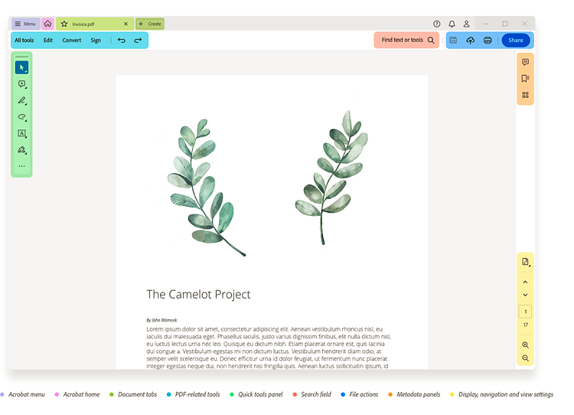
<span style="mso-bidi-font-family: 'Calibri Light'; mso-bidi-theme-font: major-latin; color: windowtext;"><span style="font-size: 11.0pt; line-height: 107%; font-family: 'Calibri Light',sans-serif; mso-ascii-theme-font: major-latin; mso-fareast-font-family: Calibri; mso-fareast-theme-font: minor-latin; mso-hansi-theme-font: major-latin; mso-bidi-theme-font: major-latin; mso-ansi-language: FR; mso-fareast-language: EN-US; mso-bidi-language: AR-SA;">En tenant compte de la tendance de l’utilisateur à parcourir les éléments de gauche à droite, les méga verbes et tous les outils PDF ont été placés dans la zone d’action vers le côté gauche du document, et regroupé les outils de support tels que la navigation, les commandes de zoom, les informations sur la page et les commentaires à droite. Cela permet d’être flexibles dans un cadre pour créer différentes expériences sur différents écrans.</span></span><span style="font-family: 'Calibri Light',sans-serif; mso-ascii-theme-font: major-latin; mso-hansi-theme-font: major-latin; mso-bidi-theme-font: major-latin;">[![image.png](https://portail.ac-reunion.fr/ladoclela/uploads/images/gallery/2025-03/scaled-1680-/QHoimage.png)](https://portail.ac-reunion.fr/ladoclela/uploads/images/gallery/2025-03/QHoimage.png)</span><span style="font-family: 'Calibri Light',sans-serif; mso-ascii-theme-font: major-latin; mso-hansi-theme-font: major-latin; mso-bidi-theme-font: major-latin;">Tout en réorganisant les groupes, l’idée est de conserver les fonctionnalités familières des outils et des workflows pour assurer que la transition n’était pas trop perturbante. </span>

<span style="font-family: 'Calibri Light',sans-serif; mso-ascii-theme-font: major-latin; mso-hansi-theme-font: major-latin; mso-bidi-theme-font: major-latin;">La disposition des outils sur toutes les surfaces Acrobat (poste de travail, web, tablette et mobile) a été réorganisé pour garantir une expérience optimisée, intuitive et ciblée sur toutes les plateformes.</span>

<span style="font-family: 'Calibri Light',sans-serif; mso-ascii-theme-font: major-latin; mso-hansi-theme-font: major-latin; mso-bidi-theme-font: major-latin;"><span style="mso-spacerun: yes;"> </span>Le cadre révisé comprend quelques améliorations notables de l’expérience. Sélectionnez chaque élément pour en savoir plus.</span><span style="font-size: 12.0pt; line-height: 107%; font-family: 'Calibri Light',sans-serif; mso-ascii-theme-font: major-latin; mso-fareast-font-family: 'Times New Roman'; mso-hansi-theme-font: major-latin; mso-bidi-theme-font: major-latin; mso-fareast-language: FR;"> </span>

<span style="font-size: 12.0pt; font-family: 'Calibri Light',sans-serif; mso-ascii-theme-font: major-latin; mso-fareast-font-family: 'Times New Roman'; mso-hansi-theme-font: major-latin; mso-bidi-theme-font: major-latin; mso-fareast-language: FR;"> </span>

[![image.png](https://portail.ac-reunion.fr/ladoclela/uploads/images/gallery/2025-03/scaled-1680-/cp8image.png)](https://portail.ac-reunion.fr/ladoclela/uploads/images/gallery/2025-03/cp8image.png)

#### **<span style="mso-bidi-font-family: 'Calibri Light'; mso-bidi-theme-font: major-latin; color: windowtext;">Menu Hamburger</span>**  


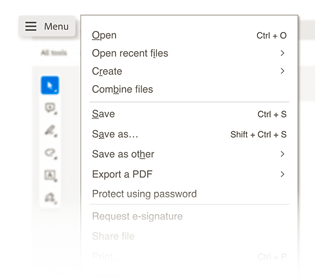
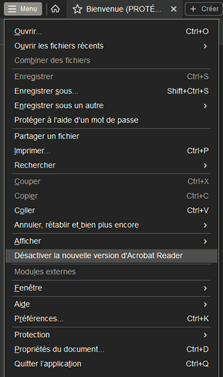
<span style="font-size: 12.0pt; font-family: 'Calibri Light',sans-serif; mso-ascii-theme-font: major-latin; mso-fareast-font-family: 'Times New Roman'; mso-hansi-theme-font: major-latin; mso-bidi-theme-font: major-latin; mso-fareast-language: FR;">Le menu « **hamburge**r » propose les actions les plus utilisées au même endroit. Sous Windows, il est utile de combiner toutes les options actuellement disponibles dans les menus Fichier, Modifier et Affichage existants.</span>

<span style="font-family: 'Calibri Light',sans-serif; mso-ascii-theme-font: major-latin; mso-hansi-theme-font: major-latin; mso-bidi-theme-font: major-latin;"> </span>

<span style="font-family: 'Calibri Light',sans-serif; mso-ascii-theme-font: major-latin; mso-hansi-theme-font: major-latin; mso-bidi-theme-font: major-latin;"> </span>

[![Capture d'écran 2025-03-13 145004.png](https://portail.ac-reunion.fr/ladoclela/uploads/images/gallery/2025-03/scaled-1680-/GSZcapture-decran-2025-03-13-145004.png)](https://portail.ac-reunion.fr/ladoclela/uploads/images/gallery/2025-03/GSZcapture-decran-2025-03-13-145004.png)

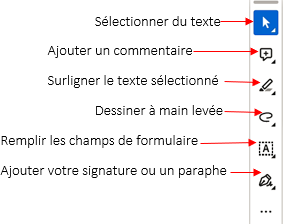
<span style="font-family: 'Calibri Light',sans-serif; mso-ascii-theme-font: major-latin; mso-hansi-theme-font: major-latin; mso-bidi-theme-font: major-latin;"> </span><span style="font-size: 12.0pt; font-family: 'Calibri Light',sans-serif; mso-ascii-theme-font: major-latin; mso-fareast-font-family: 'Times New Roman'; mso-hansi-theme-font: major-latin; mso-bidi-theme-font: major-latin; mso-fareast-language: FR;">Le panneau « **Tous les outils** » permet d’accéder au même endroit à tous les outils disponibles dans Acrobat.</span>

<span style="font-family: 'Calibri Light',sans-serif; mso-ascii-theme-font: major-latin; mso-hansi-theme-font: major-latin; mso-bidi-theme-font: major-latin;"><span style="mso-tab-count: 1;"> </span></span>

### <span style="color: rgb(35, 111, 161);"></span>

[![image.png](https://portail.ac-reunion.fr/ladoclela/uploads/images/gallery/2025-03/scaled-1680-/U4iimage.png)](https://portail.ac-reunion.fr/ladoclela/uploads/images/gallery/2025-03/U4iimage.png)

### <span style="color: rgb(35, 111, 161);"><span style="font-size: 18.0pt; line-height: 107%; mso-fareast-font-family: 'Times New Roman'; mso-fareast-language: FR;">Désactivation de la nouvelle expérience</span></span>

<span style="font-size: 12.0pt; font-family: 'Calibri Light',sans-serif; mso-ascii-theme-font: major-latin; mso-fareast-font-family: 'Times New Roman'; mso-hansi-theme-font: major-latin; mso-bidi-theme-font: major-latin; mso-fareast-language: FR;">La nouvelle expérience est une avancée encourageante pour l’avenir d’Acrobat. Mais si cela ne correspond pas à vos besoins, vous pouvez toujours revenir à l’expérience précédente.</span>

- <span style="font-size: 12.0pt; font-family: 'Calibri Light',sans-serif; mso-ascii-theme-font: major-latin; mso-fareast-font-family: 'Times New Roman'; mso-hansi-theme-font: major-latin; mso-bidi-theme-font: major-latin; mso-fareast-language: FR;">Windows : sélectionnez le menu hamburger, puis choisissez Désactiver la nouvelle version d’Acrobat. </span>
- <span style="font-size: 12.0pt; font-family: 'Calibri Light',sans-serif; mso-ascii-theme-font: major-latin; mso-fareast-font-family: 'Times New Roman'; mso-hansi-theme-font: major-latin; mso-bidi-theme-font: major-latin; mso-fareast-language: FR;">Sélectionnez « Redémarrer » </span>


[![image.png](https://portail.ac-reunion.fr/ladoclela/uploads/images/gallery/2025-03/scaled-1680-/r5Rimage.png)](https://portail.ac-reunion.fr/ladoclela/uploads/images/gallery/2025-03/r5Rimage.png)

### <span style="font-size: 18pt; line-height: 107%; color: rgb(35, 111, 161);">Activation de la nouvelle expérience</span>

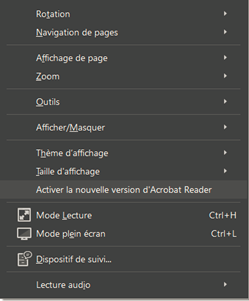
<span style="font-size: 12.0pt; font-family: 'Calibri Light',sans-serif; mso-ascii-theme-font: major-latin; mso-fareast-font-family: 'Times New Roman'; mso-hansi-theme-font: major-latin; mso-bidi-theme-font: major-latin; mso-fareast-language: FR;">Si vous décidez par la suite de revenir à la nouvelle expérience, vous pouvez la rétablir à tout moment. </span>

- **<span style="font-size: 12.0pt; font-family: 'Calibri Light',sans-serif; mso-ascii-theme-font: major-latin; mso-fareast-font-family: 'Times New Roman'; mso-hansi-theme-font: major-latin; mso-bidi-theme-font: major-latin; mso-fareast-language: FR;">Sous Windows</span>**<span style="font-size: 12.0pt; font-family: 'Calibri Light',sans-serif; mso-ascii-theme-font: major-latin; mso-fareast-font-family: 'Times New Roman'; mso-hansi-theme-font: major-latin; mso-bidi-theme-font: major-latin; mso-fareast-language: FR;"> : dans le menu supérieur, sélectionnez Affichage &gt; Activer la nouvelle version d’Acrobat. </span>
- <span style="font-size: 12.0pt; font-family: 'Calibri Light',sans-serif; mso-ascii-theme-font: major-latin; mso-fareast-font-family: 'Times New Roman'; mso-hansi-theme-font: major-latin; mso-bidi-theme-font: major-latin; mso-fareast-language: FR; mso-bidi-font-weight: bold;">Sélectionnez « Redémarrer »</span>

<span style="font-size: 12.0pt; font-family: 'Calibri Light',sans-serif; mso-ascii-theme-font: major-latin; mso-fareast-font-family: 'Times New Roman'; mso-hansi-theme-font: major-latin; mso-bidi-theme-font: major-latin; mso-fareast-language: FR;"><span style="mso-spacerun: yes;"> </span></span>

<span style="font-family: 'Calibri Light',sans-serif; mso-ascii-theme-font: major-latin; mso-hansi-theme-font: major-latin; mso-bidi-theme-font: major-latin;"> </span>

<span style="font-family: 'Calibri Light',sans-serif; mso-ascii-theme-font: major-latin; mso-hansi-theme-font: major-latin; mso-bidi-theme-font: major-latin;"> </span>

<span style="font-family: 'Calibri Light',sans-serif; mso-ascii-theme-font: major-latin; mso-hansi-theme-font: major-latin; mso-bidi-theme-font: major-latin;"> </span>

Pour plus d’informations, consultez la documentation officielle :  
[<span class="align-center" style="font-family: 'Calibri Light',sans-serif; mso-ascii-theme-font: major-latin; mso-hansi-theme-font: major-latin; mso-bidi-theme-font: major-latin;">https://helpx.adobe.com/fr/acrobat/learn-new-acrobat.html</span>](https://helpx.adobe.com/fr/acrobat/learn-new-acrobat.html)<span style="font-family: 'Calibri Light',sans-serif; mso-ascii-theme-font: major-latin; mso-hansi-theme-font: major-latin; mso-bidi-theme-font: major-latin;"></span>